DigitalOcean is one of the prominent cloud providers, which has a long range of products with the best UX for beginners, middle-level users, and developers.
The cloud platform welcomes new users with open hearts as it provides up upto $200 credit to new users. So they can try their server without any cost, and once they get satisfied, they can stick with it.
In the post, we have collected many coupons and promo codes that can benefit you with huge credits.
Table of Contents

DigitalOcean $200 Promo Code

How to Apply DigitalOcean Promo Code
1. Click on any coupon link.

2. Put down your email address and password in the sign-up box. Hit create free account.
3. Go to your inbox, find the confirmation mail, and click the confirmation link to validate your email address.
4. You can add your PayPal account, which will require a transaction of at least $5. The payment of $5 will be used after a 60-day trial period. 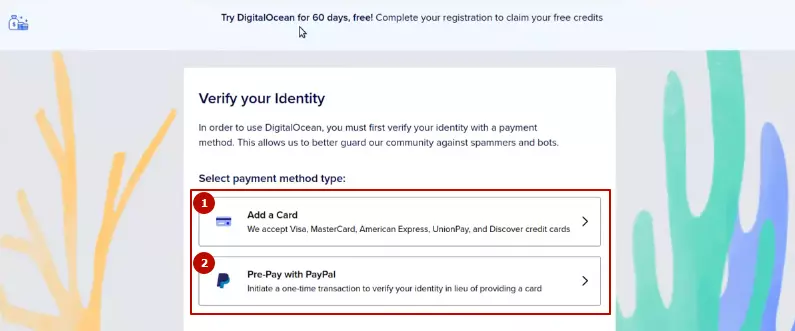 Don’t want to pay anything? Link your card.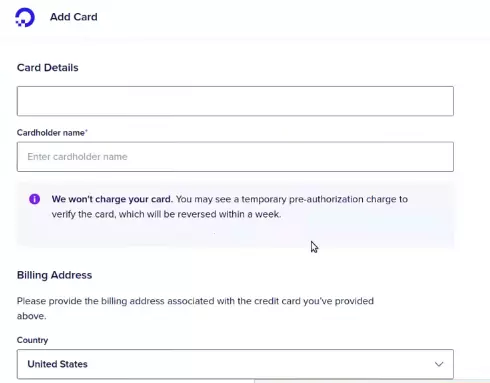
5. Enter your billing address.
6. You will be redirected to the PayPal payment page, where you can pay $5. (If you had opted for Paypal.)
7. Now your account is fully activated.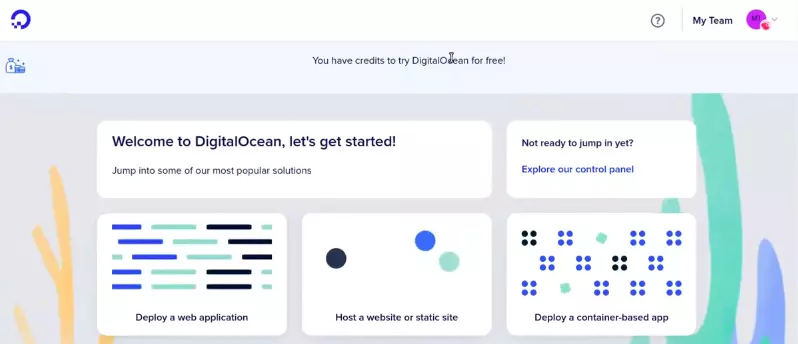
About DigitalOcean
DigitalOcean is a popular cloud infrastructure platform designed for developers, startups, and businesses that need simple and reliable hosting. Founded in 2011, it is known for its easy-to-use dashboard and quick server deployment.
Users can launch virtual servers called Droplets in just a few seconds. The platform offers SSD-based servers, global data centers, scalable resources, and strong networking performance.
It also provides managed databases, Kubernetes, object storage, and developer-friendly APIs. Because of its simplicity and transparent pricing, it has become one of the most preferred cloud providers for hosting websites, applications, and VPS servers.
Pricing
The host has 5 kinds of hosting plans. You can choose one as per your project.
Shared CPU Plan – The plan comes with a basic virtual machine with a mix of memory and compute resources. It is best for small projects that can handle variable levels of CPU performance, like blogs and web apps. Additionally, you will have the choice to choose between regular chips, premium Intel, and premium AMD with an NVMe SSD.
| RAM | CPU | Storage | Bandwidth | Price |
| 512 MB | 1 Core | 10 GB SSD | 500 GB | $4/mo |
| 1 GB | 1 Core | 25 GB SSD | 1 TB | $6/mo |
| 2 GB | 1 Cores | 50 GB SSD | 2 TB | $12/mo |
| 2 GB | 2 Cores | 60 GB SSD | 3 TB | $18/mo |
| 4 GB | 2 Cores | 80 GB SSD | 4 TB | $24/mo |
| 8 GB | 4 Cores | 160 GB SSD | 5 TB | $48/mo |
| 16 GB | 8 Cores | 320 GB SSD | 6 TB | $96/mo |
General Purpose Plan – It derives high-performance virtual machines with a good balance of memory and dedicated hyper-threads from best-in-class Intel chips. It is a good choice for production websites, e-commerce sites, and enterprise applications.
| RAM | CPU | Storage | Bandwidth | Price |
| 8 GB | 2 Core | 25 GB SSD | 4 TB | $63/mo |
| 16 GB | 4 Core | 50 GB SSD | 5 TB | $126/mo |
| 32 GB | 8 Cores | 100 GB SSD | 6 TB | $252/mo |
| 64 GB | 16 Cores | 200 GB SSD | 7 TB | $504/mo |
| 128 GB | 32 Cores | 400 GB SSD | 8 TB | $1008/mo |
| 160 GB | 40 Cores | 500 GB SSD | 9 TB | $1260/mo |
CPU Optimized Plan – It is best for CPU-intensive applications like video rendering, machine learning, and ad serving, as it is a compute-optimized virtual machine with dedicated hyper-threads.
| RAM | CPU | Storage | Bandwidth | Price |
| 4 GB | 2 Core | 25 GB SSD | 4 TB | $42/mo |
| 8 GB | 4 Core | 50 GB SSD | 5 TB | $84/mo |
| 16 GB | 8 Cores | 100 GB SSD | 6 TB | $168/mo |
| 32 GB | 16 Cores | 200 GB SSD | 7 TB | $336/mo |
| 64 GB | 32 Cores | 400 GB SSD | 9 TB | $672/mo |
Memory Optimized Plan – It is ideal for RAM-intensive applications like high-performance databases, web-scale in-memory caches, and real-time big data processing.
| RAM | CPU | Storage | Bandwidth | Price |
| 16 GB | 2 Core | 50 GB SSD | 4 TB | $84/mo |
| 32 GB | 4 Core | 100 GB SSD | 6 TB | $168/mo |
| 64 GB | 8 Cores | 200 GB SSD | 7 TB | $336/mo |
| 128 GB | 16 Cores | 400 GB SSD | 8 TB | $672/mo |
| 192 GB | 24 Cores | 600 GB SSD | 9 TB | $1008/mo |
| 256 GB | 32 Cores | 800 GB SSD | 10 TB | $1344/mo |
Storage-Optimized Plan – It is suitable for storage-intensive projects.
| RAM | CPU | Storage | Bandwidth | Price |
| 16 GB | 2 Core | 300 GB NVMe | 4 TB | $131/mo |
| 32 GB | 4 Core | 600 GB NVMe | 6 TB | $262/mo |
| 64 GB | 8 Cores | 1.17 TB NVMe | 7 TB | $524/mo |
| 128 GB | 16 Cores | 2.34 TB NVMe | 8 TB | $1048/mo |
| 192 GB | 24 Cores | 3.53 TB NVMe | 9 TB | $1572/mo |
| 256 GB | 32 Cores | 4.69 TB NVMe | 10 TB | $2096/mo |
Which DigitalOcean Server Locations Should I Choose?
The best DigitalOcean data center depends mainly on where your website visitors are located. The closer the server is to your audience, the lower the latency and the faster your site loads.
- If your audience is in India or Asia
Choose one: Bangalore (BLR1) or Singapore (SGP1)
Best for India, Southeast Asia, and nearby regions
Lower latency and faster website loading for Asian users
- If your audience is in Europe
Choose one: Frankfurt (FRA1), Amsterdam (AMS), or London (LON1)
Frankfurt and Amsterdam are popular because they are major internet hubs.
- If your audience is in North America
Choose:
New York (NYC1/2/3) – Best for East Coast and Europe traffic
San Francisco (SFO1/2/3) – Best for West Coast users
Toronto (TOR1) – Good for Canada
- If your audience is in Australia
Choose: Sydney (SYD1)
DigitalOcean currently has around 15 data centers across multiple global regions, including New York, San Francisco, Amsterdam, London, Frankfurt, Singapore, Bangalore, Toronto, and Sydney.
✅ Simple rule:
Always choose the closest data center to your target users for the best performance.
DigitalOcean Promo Code Alternative
Vultr is a great counterpart for DigitalOcean. As the cloud platform has the widest and strongest infrastructure, which consists of 32 global data centers, GPUs, the latest Intel & AMD processors, and NVMe SSDs. The giant provides a $300 credit for new users.
FAQ
1. Does DigitalOcean really offer a $200 free credit?
Yes, DigitalOcean offers up to $200 free credit for new users. This credit is generally valid for 60 days and can be used to deploy Droplets (VPS), managed databases, Kubernetes clusters, GPU servers, and other cloud services. However, you must add a valid credit card or PayPal account to activate the free trial.
2. Do I need a credit card to claim the DigitalOcean free trial?
Yes, in most cases DigitalOcean requires a credit card or PayPal account to verify your identity. This helps prevent abuse of the free trial system. The payment method is used only for verification, and you will not be charged unless your usage exceeds the free credit or after the trial period ends.
3. What can I do with the $200 DigitalOcean credit?
You can use the credit to test almost all services offered by DigitalOcean, including:
- Launching Droplets (cloud VPS servers)
- Hosting WordPress websites
- Running AI or GPU workloads
- Creating managed databases
- Deploying apps using App Platform
- Using object storage or Kubernetes
This allows you to fully test the platform before spending your own money.
4. How long does the DigitalOcean free credit last?
The $200 credit is usually valid for 60 days from the date you activate your account. If you do not use the entire credit within that period, the remaining balance will expire automatically.
5. What happens after the DigitalOcean free trial ends?
Once the 60-day trial expires or the credit is fully used, your services will continue running, and your added payment method will be billed for further usage. If you do not want to be charged, you should destroy your resources or close your account before the trial ends.

Ravi Kumar is a Server Performance Analyst with over 4 years of experience benchmarking cloud infrastructure. He has optimized and stress-tested over 150+ websites, digging deep into uptime, disk latency, and CPU performance. Whether you’re looking for a free trial or a high-performance production server, Ravi uses real-world data to help you find the perfect host.