You know what, we’re heading to zero human companies. Thanks to Paperclip, it is possible to run multiple agents simultaneously. You can deploy multi-LLM models and assign them different jobs, like CEO, CTO, CMO, COO, coder, or writer. It’s going to be an autonomous company that needs reliable and solid infrastructure to run smoothly.
Therefore, I’ve tested and brought up a list of the best 5 VPSs that are ready to deploy your first autonomous company.
Previously, I wrote the best 5 OpenClaw VPSs if you want a pre-configured OpenClaw VPS. It will be worth it to check out. You can also check TikTok VPS.
Let’s get started.

Table of Contents
What is Paperclip
In simple words:
If OpenClaw is an employee, Paperclip is the company.
It is an open-source orchestration platform that let you create a complete “AI company” instead of a chatbot.
It is a Node.js server and React UI that orchestrates a team of AI agents to run a business.
You can bring your own agents, assign goals, and track your agents’ work and costs from one dashboard.
It looks like a task manager, but under the hood it has org charts, budgets, governance, goal alignment, and agent coordination.
Use case of Paperclip
- Build autonomous AI companies
- Coordinate many different agents (OpenClaw, Codex, Claude, Cursor) toward a common goal
- Manage 20 simultaneous Claude Code terminals
- Run agents autonomously 24/7 but still want to audit work and chime in when needed
- Monitor costs and enforce budgets
- Manage agents that feels like using a task manager
- Manage your autonomous businesses from your phone
What is Paperclip VPS
A server with dedicated resources is designed to deploy Paperclip to automate AI agents, workflows, and business operations.
It can handle agents’ unpredictable CPU spikes, as these work autonomously on a schedule, waking up every 30 seconds, checking their inbox, and executing tasks.
So the kind of VPS runs 24/7 and keeps the AI system alive around the clock.
System Requirement
| Component | Minimum (Testing) | Recommended (Production) | High-Scale (Multiple AI Agents) |
|---|---|---|---|
| CPU | 1 vCPU | 2–4 vCPU | 6–8+ vCPU |
| RAM | 2 GB | 4–8 GB | 16+ GB |
| Storage | 20 GB SSD | 40–80 GB SSD | 100+ GB NVMe |
| OS | Ubuntu 22.04 | Ubuntu 22.04 / 24.04 | Ubuntu 24.04 |
| Runtime | Node.js 20+ | Node.js 20+ / 22 LTS | Node.js 22 LTS |
| Package Manager | pnpm (latest) | pnpm (latest) | pnpm (latest) |
| Database | Embedded PostgreSQL | Embedded or External PostgreSQL | External PostgreSQL (recommended) |
| Network | Basic IPv4 | Public IP + Domain | Load-balanced / multi-node |
| Port | 3100 (default) | 3100 + reverse proxy | 3100 + Nginx/Caddy + SSL |
| Uptime | Manual run | 24/7 uptime | Process manager + auto-restart |
| Security | Local mode | Authenticated (private/public) | Full auth + firewall + SSL |
How to Choose Right Paperclip VPS
Location – As you’re going to manage your business, the closer the VPS location is to you, the better for the lowest latency and quick execution.
Uptime – You can sleep, but the AI agents act on the assigned tasks around the clock. Minimally 99.95% Uptime is essential.
Scaliblity – At Paperclip, you can add many digital employees, aka AI agents, which are resource hungry. So always choose a VPS provider where you can upgrade your resources within a few clicks instantly.
Flexibility – If you can get flexibility to choose the size of RAM, CPU, and SSD as per your needs, you can build the optimum VPS, exactly what you need. It will also save your money.
Modest Payment Model – Hourly billing and pay-as-you-go payment model carry the best picture of flexible investing to infrastructure.
Hourly billing is going to be best for testing, and a pay-as-you-go model will keep you away from the headache of paying upfront.
Best 5 Paperclip VPS Providers [Free Trial Too]
1. Kamatera
Unpredictable spiking in nature, event-based triggers, and scheduled heartbeats are the core of any agent’s needs an enterprise-grade infrastructure is built for.
Kamatera is known as one of the leading enterprise-grade resources in the world, which makes it a rock-solid choice to run AI automation with a powerful Intel Xeon processor, DDR5 RAM, NVMe SSD, and 1 Gbps port speed.
And you know, it has been built with fully flexible scalability when it comes to selecting the size of RAM, CPU, and SSD for your VPS and paying hourly but later.
In an independent test, it historically has delivered 100% uptime, despite facing multiple stress tests. And the server has outperformed their counterfeits in many categories. You can read the full text here.
At the StrongCloud platform, you can deploy Paperclip with the Node.js 1-click app in a few minutes. The 1-click Docker app is also available for Paperclip setup.
The giant loves to encourage beginners to deploy VPS to unlock the pinnacle of performance, reliability, and security. That’s why it provides a 30-day trial with a $100 credit. It requires a credit card.
Next month, 1 core CPU, 2 GB RAM, and 20 GB NVMe SSD will cost you only $6 per month.
Their expert support is on the go over multiple channels like live chat, email, and phone calls while you face any queries.
Moreover, disaster recovery management, DDoS protection, cloud firewall, and daily backup get you back.
- Enterprise-Grade Resources
- Setup Paperclip with 1-click Node.js App
- Belligerent Reliability
- 24 Global Data Centers
- Ironclad Security
- 24/7 Expert Support over Live Chat, Phone & Tickets
- Costly Managed Service
2. VPSServer
Having a business-class server with an affordable pricing tag carries the cloud platform as a great choice for the developers who are with tiny pockets.
Recommended system requirements for Paperclip can be deployed for under $6 per month. However, your first month will cost you nothing, as the cloud platform also offers a 30-day trial.
You can deploy a 1-click Node.js app on the server built with the latest Intel Xeon processor, DDR5 RAM, and NVMe SSD right around you for ensuring smoother running of the AI system.
Meanwhile, if you encounter any issue, you can hit their support team through 24/7 live chat and email mode.
Daily backups will ensure your data safety internally, while firewall and DDoS protection will guard your server from uninvited outsiders.
- Business Class Resources
- Setup Paperclip with Docket and Node.js App
- 24 Global Data Centers
- Reliable Data Security
- 99.99% Uptime Guarantee
- Flexible Expert Support
- SSH key management options are limited
3. Hostinger 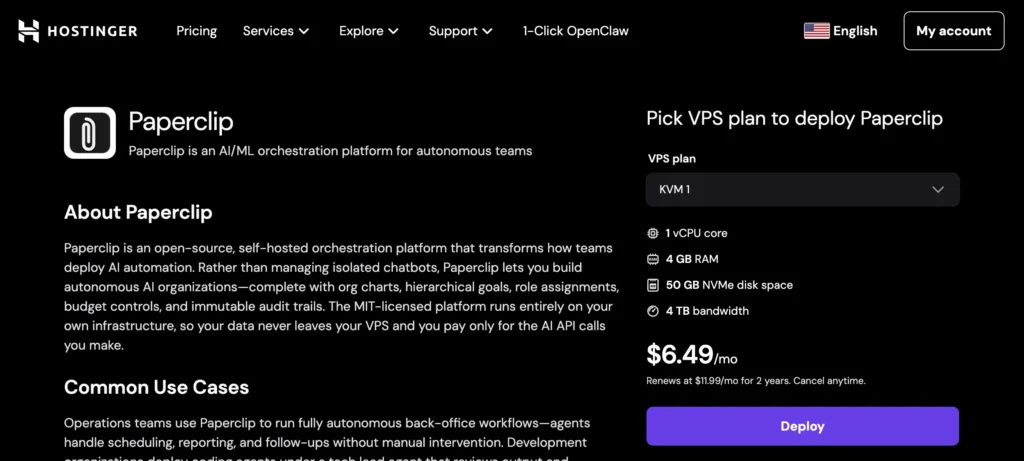
If you’re an absolute beginner, Hostinger has a real 1-click Paperclip setup installation. You don’t need to hit the terminal or touch any coding line. It is a GUI-based solution.
However, the host runs Paperclip via Docker. It’s all done by their excellent script.
Its entry-level Paperclip plan costs $6.49 per month if you go for a 2-year plan. It’s kind of a long-term commitment.
The VPS consists of powerful infrastructure like DDR4 RAM, an AMD EPYC processor, and an NVMe SSD.
Daily auto-backup will secure you and quickly restore your data without any compromises.
And their 11 data centers in strategic locations ensure faster latency around you.
- Beginner-Friendly
- 1-click Paperclip Setup
- Auto-Backup
- Reliable Infrastructure
- Long-term commitment
4. Vultr 
Vultr has been a popular choice for developers and web admins because of its high-frequency chips (>3 GHz), GPUs, and big network of 32 global data centers.
Under its elegant dashboard, you can find 1-click Node.js and set up your Paperclip.
Like the counterparts, the giant platform offers a 30-day trial, too. It will be a no-brainer to start experimenting with the automated system.
You know what? When it comes to infrastructure flexibility, it has an edge over others because of the choice to select Intel or AMD chips.
By the way, the starter package for Paperclip will cost $12 per month on both chips.
- Robust Infrastructure
- High-Performance Chips
- Massive Network of Data Centers
- Daily Backup
- Paperclip setup via 1-click Node.js & Docker App
- Ticket-Based Support Only
5. Digitalocean 
Bringing optimum UX and flexible pricing makes it desired among developers as well as novices.
A minimum paperclip package incurs $12 / month for regular SSDs, $16 / month for Intel & NVMe SSDs, and $17 / month for AMD & NVMe SSDs.
The cloud platform provides a GPU VPS for managing industry-grade automated systems. However, you can launch VPS at no cost for free with its 30-day trial.
A regular snapshot is available to store your data on an offsite server. Plans come with basic DDoS protection and manual firewall setup.
- Best UX
- Reliable Resources
- Paperclip setup via 1-click Node.js & Docker App
- 15 Global Data Centers
- Poor ticket-based Support
FAQ
1. What is Paperclip VPS?
Paperclip VPS is a virtual private server used to host and run the Paperclip AI platform, allowing users to manage multiple AI agents, workflows, and automated business operations 24/7. It provides dedicated resources like CPU, RAM, and storage to handle continuous agent activity and workload spikes.
2. What are the minimum requirements to run Paperclip on VPS?
To run Paperclip for testing, you need:
- 1 vCPU
- 2 GB RAM
- 20 GB SSD storage
- Node.js 20+
- Ubuntu 22.04
However, for production use, at least 2–4 vCPU and 4–8 GB RAM are recommended for stable performance.
3. Why do I need a VPS for Paperclip instead of local hosting?
Paperclip requires continuous uptime because AI agents operate autonomously, checking tasks and executing workflows regularly. A VPS ensures:
- 24/7 operation
- Better performance for multiple agents
- Remote access from anywhere
- Stable environment for automation
Local systems cannot provide consistent uptime or scalability.
4. Can Paperclip handle multiple AI agents on a single VPS?
Yes, Paperclip is designed to run multiple AI agents simultaneously. However, as you increase the number of agents, resource usage (CPU & RAM) also increases. For multiple agents, a VPS with at least 8–16 GB RAM and higher CPU cores is recommended.
5. Which VPS features should I look for when hosting Paperclip?
When choosing a VPS for Paperclip, focus on:
- High uptime (99.95% or above)
- Scalable resources (CPU/RAM upgrade)
- NVMe SSD storage for speed
- Global data centers for low latency
- Hourly or pay-as-you-go pricing
These features ensure smooth operation of AI agents and long-term scalability.

Ravi Kumar is a Server Performance Analyst with over 4 years of experience benchmarking cloud infrastructure. He has optimized and stress-tested over 150+ websites, digging deep into uptime, disk latency, and CPU performance. Whether you’re looking for a free trial or a high-performance production server, Ravi uses real-world data to help you find the perfect host.