Kamatera may not be suitable for you. Then you should delete your account on the platform to avoid any charges and consider hiring another, better cloud host.
However, if you are a beginner and are having difficulty launching your first cloud server and setting up your website. You can look at my simple guide.
However, you tested their cloud server and found it to be less than useful. I’ve created a simple tutorial. By following it, you can quickly and easily delete your account.
By the way, Vultr is an excellent substitute for Kamatera. It is the best in ease of use, as we have experienced since 2019. Their servers are so powerful, with a 3 GHz AMD processor and SSD. They provide a $100 credit for 30 days.
Now let’s plunge into the post.
Table of Contents
How To Cancel Kamatera Subscription
Kamatera not working out for you? No worries—you can delete your account to avoid any future charges. This step-by-step guide walks you through submitting a support ticket to request deletion. Just log in, go to the support section, create a new ticket, choose the “Account Manager” department, and request account termination.
👉 Heads-up: There’s no refund for unused pay-as-you-go credits—use them before deleting.
👉 Prefer something easier? Vultr, and IONOS offer beginner-friendly platforms with free trials, fast CPUs, and 1-click app installs.
Need help fast? Email support@kamatera.com or call +1-212-738-9656.
Pro Tip: Backup everything. Deletion wipes all servers and data, and it’s irreversible.
Time to complete: ~24–48 hours
Cost: Free (but no refund for remaining balance)
I recommend that you delete all instances before proceeding.
1. Log in to the Kamatera Console
2. Navigate to the Support Section on the left side.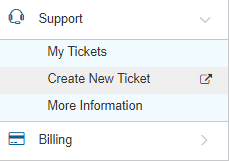
3. Click the “Create New Ticket” button.
4. A ticket box will appear.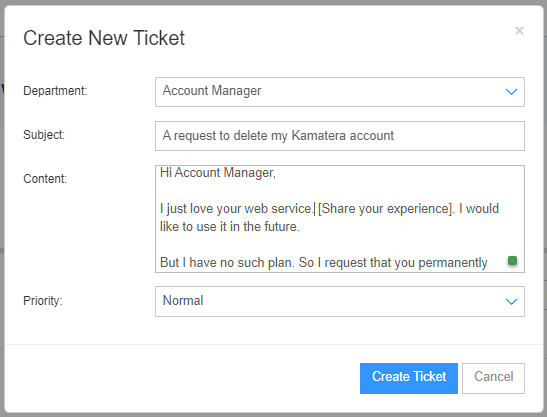
5. Select Account Manager Department.
6. Add subject line “A request to delete my Kamatera account”
7. Write your message in the content box.
“Hi Account Manager,
I just love your web service [Share your experience]. I would like to use it in the future.
But I have no such plan right now. So I request you permanently delete my account.
Thanks in advance
[Your Name]”
8. Select normal priority.
9.Click to create a ticket button.
Your account manager will review your ticket and proceed accordingly. You can also email support@kamatera.com or call +1-212-738-9656 to submit the same request.
Kamatera Alternatives
Vultr
Vultr is highly recommended for 3 GHz+ high-frequency CPU and NVMe storage that blaze up speed of the web server while having a load.
Moreover, 29 global data centers provide true flexibility in choosing the closest data center to the audience in order to get the fastest TTFB.
DDoS protection, daily backup, and 100+ one-click apps make it easy for a beginner to setup and run VPS hassle-free. You can hang out with them for free for 30 days.
IONOS
The European host offers unmetered VPS service with pricing starting at $2 and 7 ISO 27001-certified data centers around the world.
Data is stored in a 100% SSD SAN storage environment with full virtualization, resulting in high efficiency and performance. They invite you to try them out for 30 days for $2.
How to Receive a Refund from Kamatera
It is simple to cancel an account with the host. The entire procedure was flawless.
However, any funds left in your account will be forfeited because they have no refund policy for pay-as-you go payments. So, before considering cancellation, use the entire balance.
FAQ
1. How can I delete my Kamatera account to avoid future charges?
To delete your Kamatera account, log in to the console, go to the Support section, click “Create New Ticket,” select the Account Manager department, and request permanent account deletion. Kamatera processes these requests within 24 to 48 hours. You can also email support@kamatera.com
or call their support number if you prefer direct contact.
2. Do I need to delete my servers before closing my Kamatera account?
Yes. You must delete all active servers, block storage, private networks, and snapshots before requesting account deletion. If anything remains, Kamatera continues billing under the pay-as-you-go model. Once everything is removed, you can safely proceed with the deletion request.
3. Will Kamatera refund my remaining account balance?
No. Kamatera does not refund unused credits or remaining pay-as-you-go balance. Any leftover funds in your account are forfeited after account termination. It is best to use the entire balance before requesting deletion.
4. How long does it take for Kamatera to delete my account?
Account deletion typically takes between 24 and 48 hours. Their account manager manually reviews the request, verifies that no active resources remain, and then closes the account. You will receive a confirmation email once the process is complete.
5. What should I do if Kamatera feels too technical or difficult to use?
If Kamatera feels overwhelming as a beginner, switching to a simpler platform is a smart move. Vultr and IONOS both offer beginner-friendly dashboards, one-click app installs, powerful CPUs, and free trial credits. Vultr is especially loved for its ease of use, fast 3 GHz processors, and strong global coverage.
6. Is deleting my Kamatera account reversible?
No. Once your account is deleted, all servers, data, IP addresses, and backups are wiped permanently. Kamatera cannot restore deleted data. Make sure to download your backups and save important files before submitting the deletion request.

Ravi Kumar is a Server Performance Analyst with over 4 years of experience benchmarking cloud infrastructure. He has optimized and stress-tested over 150+ websites, digging deep into uptime, disk latency, and CPU performance. Whether you’re looking for a free trial or a high-performance production server, Ravi uses real-world data to help you find the perfect host.
so we talking bout kamatera like its bad but aint all these cloud things the same? just pick one and hope for the best.
Great to see someone laying out the options! Been thinking of moving away from Kamatera for a bit, and this just might be the push I needed. Thanks for the insights!
Got to wonder if these alternatives are any better. Anyone got any experience they wanna share? Not sure who to trust anymore.
Oh wow, another cloud service that’ll probably take my money and ghost me. Can’t wait to sign up and then struggle to cancel. Sounds fun.
kinda confused bout all this tech stuff, but i get that cancelling needs to be easier. why they gotta make it so complicated?
appreciate the alternatives list! always lookin for ways to cut costs without losing performance. gonna check out DigitalOcean and Vultr. cheers for the heads up, Ravi Kumar!
never tried kamatera myself, but been hearing mixed things. some say it’s good, others not so much. this article’s got me thinking though. maybe time to give those alternatives a shot.
Kamatera’s refund policy is a joke. Good luck getting anything back from them. Been there, done that. Save your energy.
this kamatera thing, how it works? wanna know if it’s easy to cancel or they make it hard on purpose. and the refund stuff, how long that takes? anyone knows?
Why bother with Kamatera when there’s plenty of fish in the tech sea? These alternatives seem alright, but I’m not convinced they’re any different. Someone change my mind.
heard somethin bout Kamatera not really giving refunds easy. anyone knows if thats true? seems sketch to me if they dun let u cancel n keep ur money.
Ah yes, the classic ‘how to cancel your subscription’ saga. Always a joy to find out they’ve buried the cancel button six feet under in the settings. Haven’t used Kamatera but I’m sure it’s the same song and dance.
Actually, they’re not too bad! Found the cancel option pretty easily compared to others. Just my two cents.
never heard of kamatera before. sounds complicated. why not just use something everyone knows instead of this? seems easier to me lol
so if i wanna cancel kamatera, i just do what? and refunds, how that work exactly? not much detail here. anyone tried this before and got their money back?
Interesting article! I’ve been considering alternatives to Kamatera for a while now. Glad to see options like DigitalOcean and Vultr being mentioned. They seem like great options for someone who needs a more reliable and scalable cloud service. Thanks for the info, Ravi Kumar!
good riddance kamatera. tried to cancel last month and it was a nightmare. customer service just gives you the runaround. bet they dont mention that in their faq, do they ravi kumar?
I never used kamatera but i think all these tech companys are the same, take your money and run. just stick with what works and dont bother.
kamatera? more like kamatera-ble, am i right? haha
why cancel kamatera tho? I heard they’re pretty solid. sure, DigitalOcean and Vultr are good but ionos? really? seems like a step down to me. thoughts?
hey ravi kumar, was thinkin bout droppin kamatera but not sure how to get my $$ back? like, do they do refunds easy or is it a big hassle? anyone knows?
It depends on your plan and how long you’ve been using it. Check their terms, usually, there’s a period where you can get a refund.
good luck with that, getting a refund from a cloud service is like finding a needle in a haystack.