Are you thinking about closing your Google Cloud account?
We understand; you may be exhausted, or you might have found a better alternative, or you want to clean up online stuff.
Then it is the best choice to delete the cloud account to avoid any charges in the future.
Surely we’re going to help you through a step-by-step guide. Let’s get started.
By the way, you can try Kamatera for free for 30 days, an ideal substitute for GCP if you need a change.
The cloud offers enterprise-grade infrastructure with 2.7 GHz Intel Xeon chips, SSDs, storage, and 10 GBPS port speed for small to large projects.

Table of Contents
Unlock 5x More Performance
How to Cancel Google Cloud Account
Before proceeding, you must be aware that you’re going to close all services, volumes, projects, etc. All the data will be lost, and you won’t be able to restore it.
So make an offsite backup or download a full backup to your PC, whatever you feel comfortable with.
Now let’s initiate the process.

1. Sign in to Google Cloud Console
2. Now search for account management and click it. It will lead to your billing account.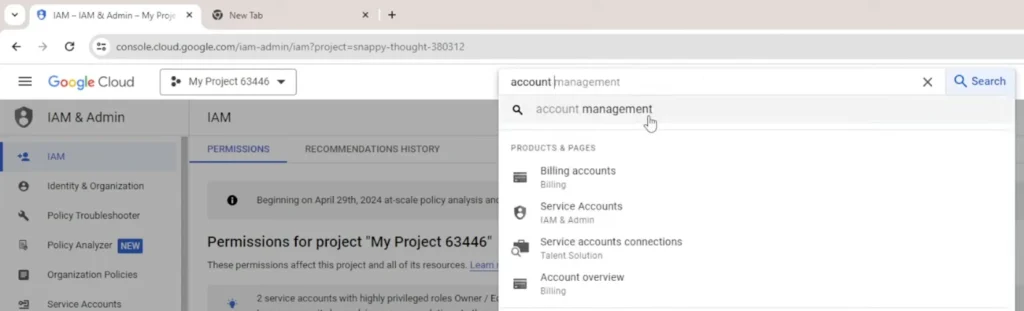
3. Click on overview to know any outstanding amount. If some amount is pending, please make a full payment.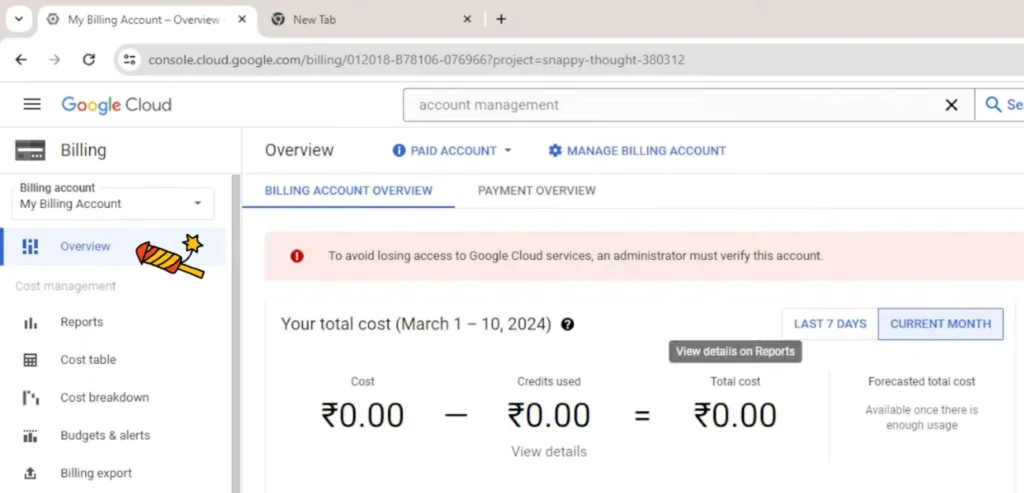
4. Go to account management; find it at the bottom in the sidebar.
5. Hit close billing account over the top, write close, and hit close billing account again.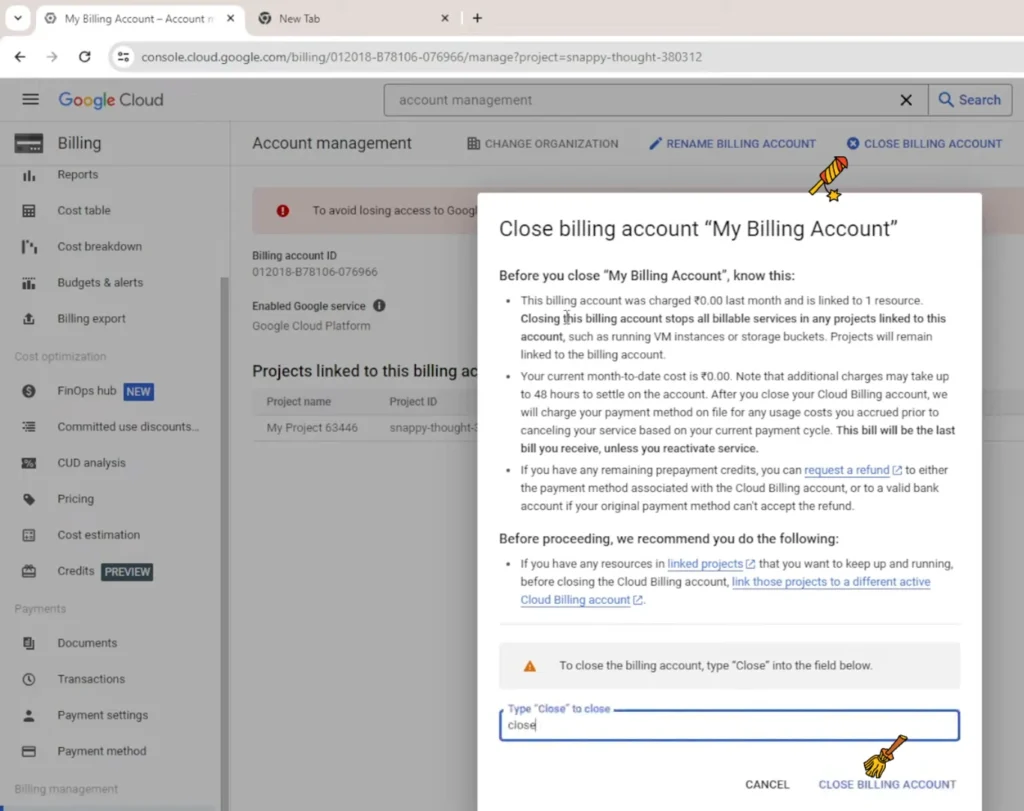
You should see, “This billing account is closed. Reopen it to continue using linked projects.”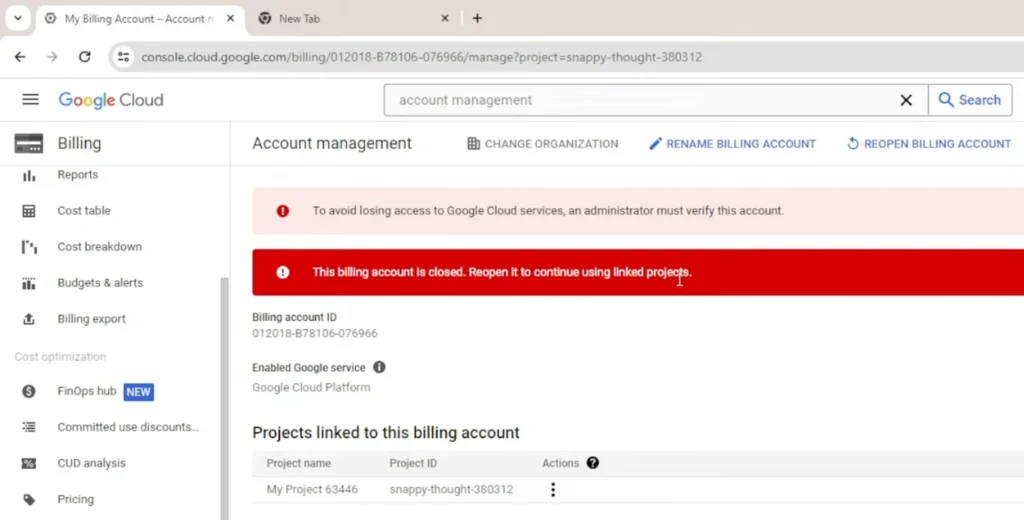
6. If there is any project, you need to disable it. Choose the disable option from actions. You will find now there is no project.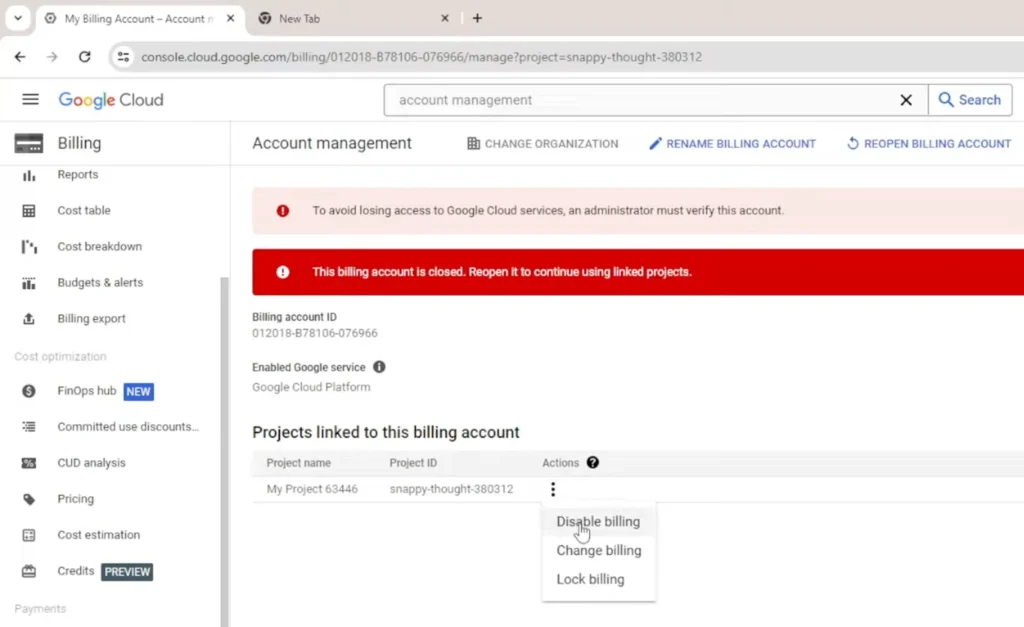
7. Now refresh the browser; the window will show “This project has no billing account.”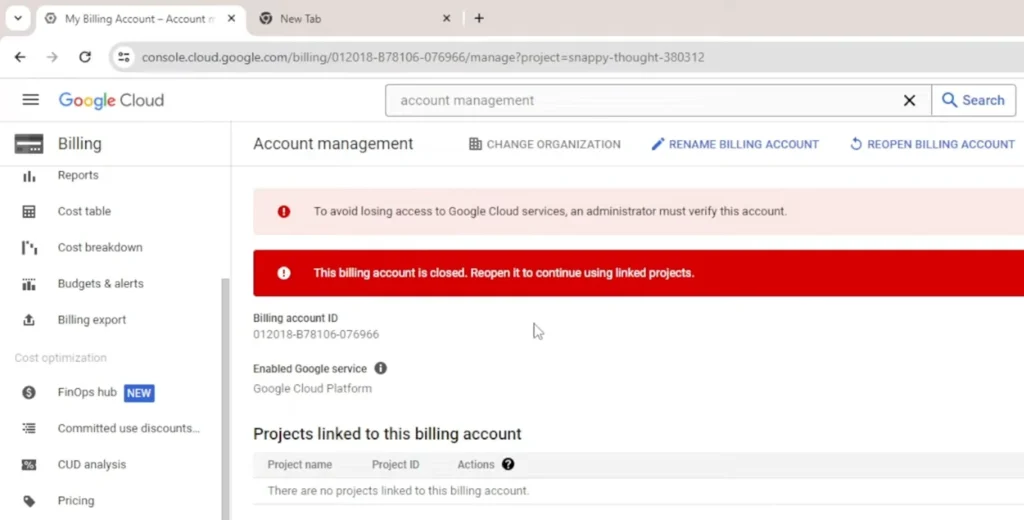
The billing account has been successfully disabled, so you won’t see any charges in the future.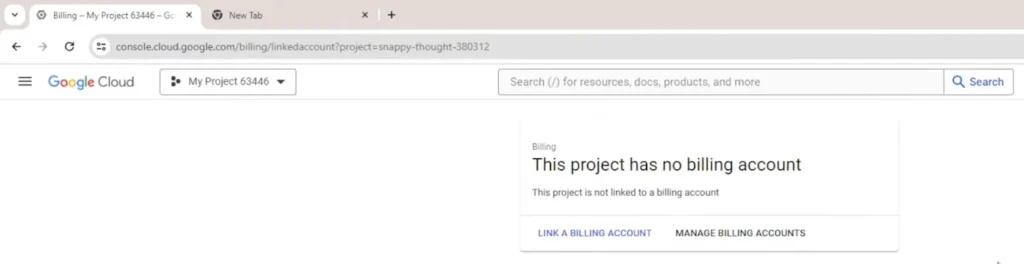
But whenever you would like to use GCP, you can enable a billing account and deploy your projects.
How To Cancel Google Cloud Free Trial
Cancelling the trial is easier than the earlier process. You need to just disable
Billing account for linked projects.
1. Log in to Google Cloud Console.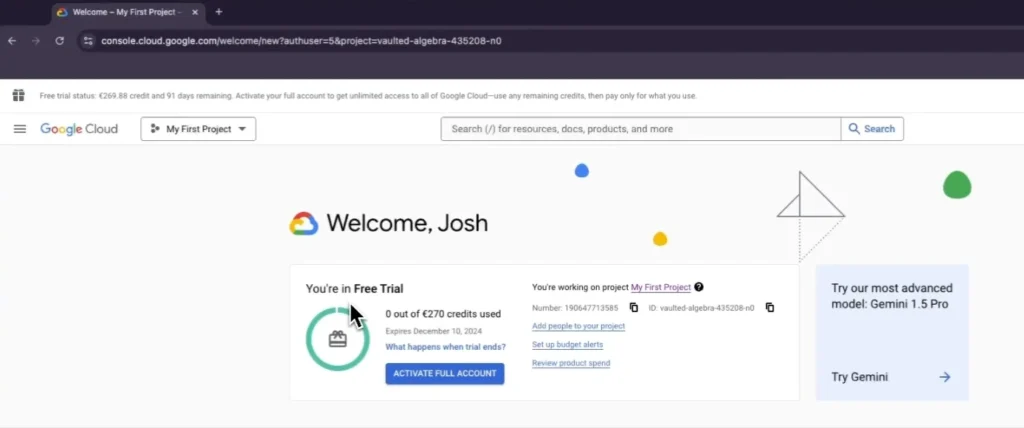
2. On left sidebar, go to billings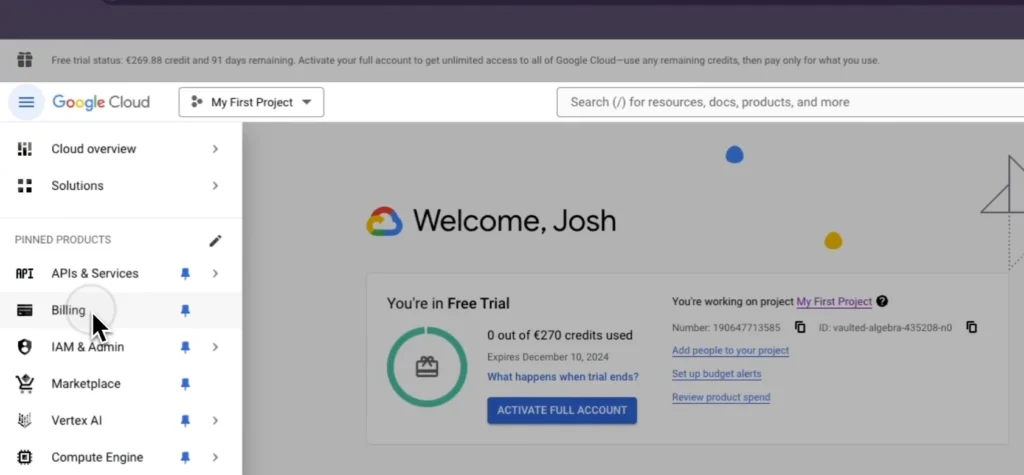
3. Click Billing account managed (Free trial) through the three dots at the top right side.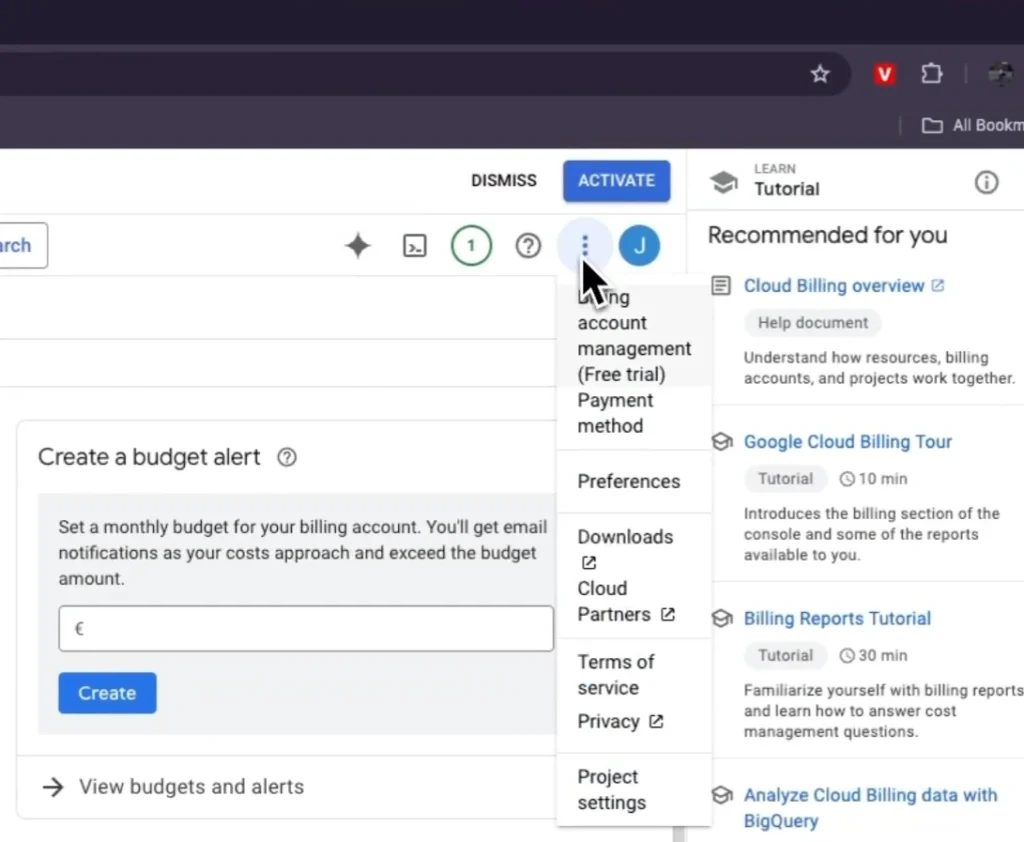
4. Now your linked projects will appear. Disable billing from the actions option.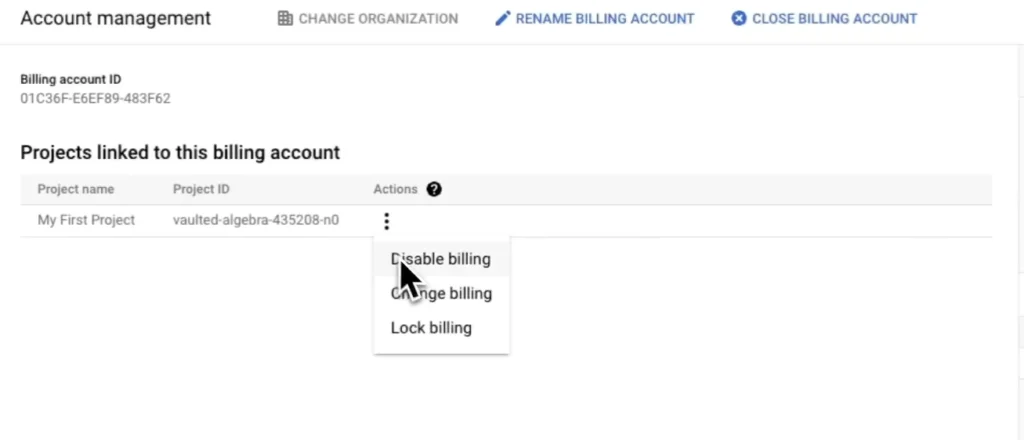
There are no projects linked to the billing account. 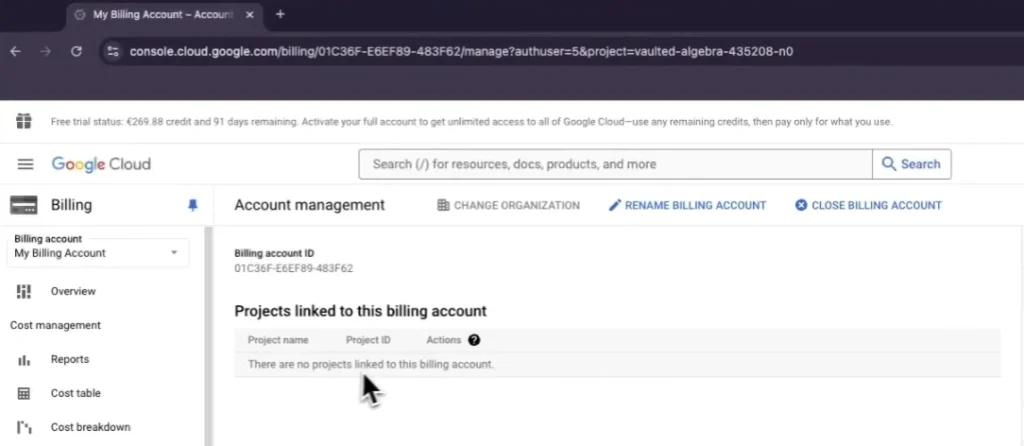 The message, if you see it. You have cancelled the trial and no future charges will occur.
How To Get Instant Refund From Google Cloud
Google Cloud sanctions refunds for various cases, but not for all.
You might get a refund.
1. Early Payment – if you make a payment and maintain a balance in GCP, then you’re eligible to receive a refund.
2. Unused Credit – if you cancel all GCP subscriptions and have a remaining credit, you can get it back.
Google doesn’t allow refunds for promotional credit, outstanding balance, and Google Cloud Storage plans.
Now follow the steps
1. First of all, cancel all subscriptions.
2. Open a support ticket with cloud identity support.
3. If you want a refund for over $1000, you may need to provide a copy of your bank statement.
The GCP team will take time, around 4 weeks. They will process and credit back your amount through your last payment method.
Alternative
Kamatera has done a tremendous job in recent years. They have heavily invested in improving their cloud server performance, security, and reliability.
We noticed the result-oriented changes in our independent test, as their server was able to achieve God-level 100% uptime and TTFB ~20 ms.
Diagonal scaling is their core identity, and 100+ one-click apps assist beginners in launching their first web property on the cloud. These two features eliminate the need for developers and allow you to choose exactly what resource you need.
You will find a cloud firewall, DDoS protection, and disaster recovery management protecting you from the front.
Moreover, if you get stuck somewhere, their support on calls, email, and live chat is ready to help you.
FAQ
Does closing a Google Cloud account stop all future charges?
Yes, once you close the billing account and disable all linked projects, Google Cloud stops generating charges instantly. The system detaches all resources, shuts down linked services, and marks your account inactive. Always double-check that no project is left active; otherwise, charges may continue silently.
Will I lose all my data after deleting my Google Cloud account?
Yes, closing the account permanently removes your stored data, volumes, snapshots, buckets, and all active services. Google does not restore deleted resources. Therefore, take a complete offsite backup or download all essential files before initiating the closure process.
How can I cancel my Google Cloud free trial?
The trial can be stopped by disabling the billing account linked to your free trial projects. Once you remove billing from each project, Google Cloud locks resource usage and stops any additional charges. You will see a confirmation message stating that no billing account is linked anymore.
Can I reopen my Google Cloud billing account in the future?
Yes, reopening is possible anytime. Even after closing the account, Google Cloud allows you to reactivate billing with a single click. Once the billing account is re-enabled, you can deploy projects again and continue using the cloud platform normally.
How do I request a refund from Google Cloud?
You can request a refund by canceling all subscriptions and opening a support ticket with Cloud Identity support. Refunds are usually approved for remaining balance, unused credit, or early payments. Promotional credits are not refundable. For refunds above a certain threshold, Google may ask for a bank statement for verification.
What is the best alternative to Google Cloud for beginners and developers?
Kamatera is an excellent alternative if you want faster performance, flexible resource scaling, and instant deployment. Their enterprise-grade infrastructure with low TTFB, SSD storage, 100+ one-click apps, and 24/7live support makes the transition extremely smooth. You also get a free 30-day trial with a generous credit to test everything without pressure.

Ravi Kumar is a Server Performance Analyst with over 4 years of experience benchmarking cloud infrastructure. He has optimized and stress-tested over 150+ websites, digging deep into uptime, disk latency, and CPU performance. Whether you’re looking for a free trial or a high-performance production server, Ravi uses real-world data to help you find the perfect host.