Wanna try Linode for free? In the post, I have covered all steps to claim a free $100 credit for your startup, SaaS, and website.
Linode (now renamed Akamai) is a quite popular cloud platform that provides a range of cloud products, such as VPS, dedicated servers, and block storage, at affordable prices.
No matter if you’re a blogger, student, developer, or business owner, you can try it and see if it meets your needs.
However, you can also explore 9 more VPSs that offer free monthly trials and collectively $700 credit.

and you can also explore some of best OpenClaw VPS with installation guide and Paperclip VPS with installation guide.
Now let’s dive into the tutorial.
Linode Startup Free Credits 

How Do I Claim Linode (Akamai)’s Free Cloud Trial?
Signing up with Linode is relatively easy. Just prepare your phone number and one payment method out of Google Play, Paypal, or Credit Card that authenticates the genuine users. Now get into the simple tutorial with a few steps.
Sign up now for Linode (Akamai) Free Trial and get →
Coupon code: auto-applied in the button below.
Be very careful with Linode Free Trial: Many redditors and YouTube viewers have reported lately that Linode has set a credit card as a requirement for the free trial offer. After canceling the account, they keep charging users’ credit cards. So we recommend Kamatera instead; otherwise, use it at your own risk.
Wanna test Linode (now Akamai) cloud for free? This guide walks you through claiming your $100 credit valid for 60 days — ideal for SaaS, startups, developers, bloggers, or even Minecraft server lovers.
You’ll unlock up to 20 VPS instances, 20 TB transfer, 100+ one-click apps, and premium features like Cloud Firewall, NodeBalancer, and server cloning. Just note: 💳 Credit card or PayPal is required (some users report post-cancellation charges, so tread carefully).
🔥 Alternatives like Kamatera offer safer billing policies.
✅ Best For: Hosting sites, launching web apps, installing VPNs, testing AI workloads.
❌ Avoid if you want no CC signup — try Kamatera or Vultr instead.
1. Visit above link
2. Click on the email button.
3. Enter your email, username, and password.
4. Now confirm your email in your inbox.
5. Verify your phone number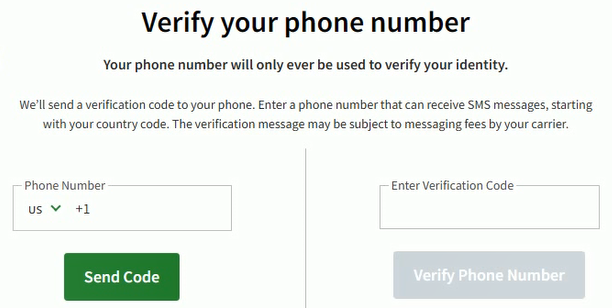
6. Select a payment method and complete the payment setup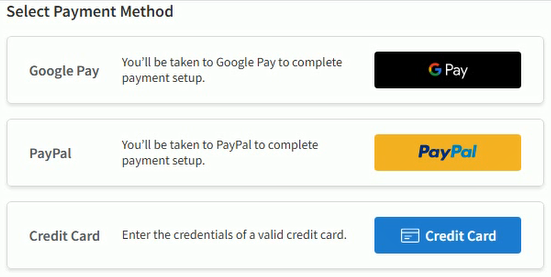
7. Enter your name and address.
8. Agree to the master services agreement
9. Click Create Account
Congratulations! Your account has been created with a free $100. You can check it out in the billing section.
Akamai Has Acquired Linode
Akamai has acquired Linode and rename the brand to Akamai, except domain “linode.com” on March 21, 2022.
The deals brings together Linode’s Infrastructure-as-a-Service solutions with
Akamai’s market-leading security and content delivery services to provide a
Comprehensive platform for building, running and security applications.
However, launching and managing server’s experience are intact.
What is Included in the Trial?
You will get the following items:
What Can You Do During the Linode-Free Tier Period?
Linode offers various products for start-ups, websites, AI, data analysis, streaming content, SAAS, and e-commerce. You can set up a base for these.
Linode Plan Pricing
While your trial period ends. You will be charged according to the plan that you have opted for.
They offer their plans in five major categories to fulfill almost all kinds of cloud customers, including bloggers, businessmen, scientists, gamers, etc.
Shared CPU Plan: The plan has been launched for beginners like bloggers and web admins. The higher plan of the group packs huge resources that are apt for a SaaS and medium-level e-commerce website.
| RAM | CPU | Storage | Bandwidth | Price |
| 1 GB | 1 Core | 25 GB SSD | 1 TB | $5/mo |
| 2 GB | 1 Core | 50 GB SSD | 2 TB | $10/mo |
| 4 GB | 2 Cores | 80 GB SSD | 4 TB | $20/mo |
| 8 GB | 4 Cores | 160 GB SSD | 5 TB | $40/mo |
| 16 GB | 6 Cores | 320 GB SSD | 8 TB | $80/mo |
| 32 GB | 8 Cores | 640 GB SSD | 16 TB | $160/mo |
| 64 GB | 16 Cores | 1280 GB SSD | 20 TB | $320/mo |
| 96 GB | 20 Cores | 1920 GB SSD | 20 TB | $480/mo |
| 128 GB | 24 Cores | 2560 GB SSD | 20 TB | $640/mo |
| 192 GB | 32 Cores | 3840 GB SSD | 20 TB | $960/mo |
Dedicated CPU Plan: The plan is designed to serve high CPU-intensive workloads that require 100% sustained CPU usage, like high-traffic websites, video rendering, machine learning, and data processing. You can run game servers like Minecraft and Team Fortress
| RAM | CPU | Storage | Bandwidth | Price |
| 4 GB | 2 Core | 80 GB SSD | 4 TB | $30/mo |
| 8 GB | 4 Core | 160 GB SSD | 5 TB | $60/mo |
| 16 GB | 8 Cores | 320 GB SSD | 6 TB | $120/mo |
| 32 GB | 16 Cores | 640 GB SSD | 7 TB | $240/mo |
| 64 GB | 32 Cores | 1280 GB SSD | 8 TB | $480/mo |
| 96 GB | 48 Cores | 1920 GB SSD | 9 TB | $720/mo |
| 128 GB | 50 Cores | 2500 GB SSD | 10 TB | $960/mo |
| 256 GB | 56 Cores | 5000 GB SSD | 11 TB | $1920/mo |
| 512 GB | 64 Cores | 7200 GB SSD | 12 TB | $3840/mo |
Premium Plan: It is like a dedicated CPU plan. The only difference is that it adds the latest generation of AMD EPYC for consistent high performance.
It is ideal for enterprise-grade, business-critical, and latency-sensitive applications. As of now, the plan is only available in the USA and France.
| RAM | CPU | Storage | Bandwidth | Price |
| 4 GB | 2 Core | 80 GB SSD | 4 TB | $43/mo |
| 8 GB | 4 Core | 160 GB SSD | 5 TB | $86/mo |
| 16 GB | 8 Cores | 320 GB SSD | 6 TB | $173/mo |
| 32 GB | 16 Cores | 640 GB SSD | 7 TB | $346/mo |
| 64 GB | 32 Cores | 1280 GB SSD | 8 TB | $691/mo |
| 96 GB | 48 Cores | 1920 GB SSD | 9 TB | $1037/mo |
| 128 GB | 50 Cores | 2500 GB SSD | 10 TB | $1382/mo |
| 256 GB | 56 Cores | 5000 GB SSD | 11 TB | $2765/mo |
| 512 GB | 64 Cores | 7200 GB SSD | 12 TB | $5530/mo |
High Memory Plan: The plan provides dedicated CPU instance resources with high memory capabilities, which are suitable for caching systems, high-performance databases, and in-memory data processing.
| RAM | CPU | Storage | Bandwidth | Price |
| 24 GB | 2 Core | 20 GB SSD | 5 TB | $60/mo |
| 48 GB | 2 Core | 40 GB SSD | 6 TB | $120/mo |
| 90 GB | 4 Cores | 90 GB SSD | 7 TB | $240/mo |
| 150 GB | 8 Cores | 200 GB SSD | 8 TB | $480/mo |
| 300 GB | 16 Cores | 340 GB SSD | 9 TB | $960/mo |
GPU Plan: The plan is GPU-optimized virtual machines accelerated by the NVIDIA Quadro RTX 6000, harnessing the power of CUDA, tensor, and core to execute complex processing, deep learning, and ray tracing workloads.
The plan is recommended for machine learning, AI, big data processing, video encoding, and graphic processing.
| RAM | CPU | Storage | Bandwidth | GPU Cards | Price |
| 32 GB | 8 Core | 640 GB SSD | 16 TB | 1 | $1000/mo |
| 64 GB | 16 Core | 1280 GB SSD | 20 TB | 2 | $2000/mo |
| 96 GB | 20 Cores | 1920 GB SSD | 20 TB | 3 | $3000/mo |
| 128 GB | 24 Cores | 2560 GB SSD | 20 TB | 4 | $4000/mo |
Data Centers
Like resources Linode is rich in the availability of data centers across the world. They have 14 data centers
in the USA, Canada, Germany, France, the UK, India, Singapore, Australia, and Japan.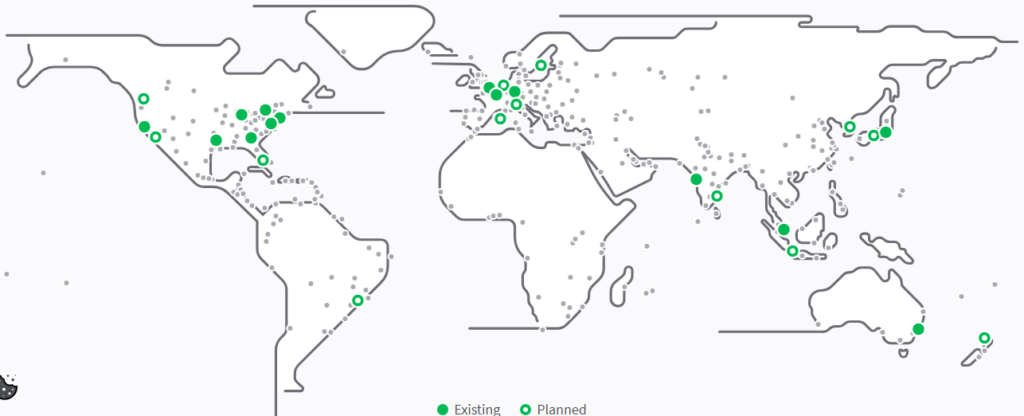
- Newark
- Washington, DC
- Toronto
- Chicago
- Atlanta
- Dallas
- Fremont
- Frankfurt
- Peris
- London
- Mumbai
- Tokyo
- Singapore
- Sydney
Conclusion
Linode, the No. 1 IaaS provider on G2, has a slew of tools for beginners and developers, including Git, SSH, one-click apps, an uncluttered dashboard, a cloud firewall, and 24×7 support.
Even some features, such as 1-click server migration to another data center and server cloning, are not available on their main competitor, Kamatera.
Furthermore, you can use their cloud resource for 30 days with a free $100 credit.
FAQ
Q1. Does Linode (Akamai) have a permanently free tier like AWS or Google Cloud?
No, and don’t let anyone tell you otherwise. Akamai does not offer a permanent free tier. What you get is a $100 credit valid for 60 days, that’s it. Once the credit runs out or the 60 days are up, whichever comes first, your linked payment method kicks in. If you need a forever-free nano instance to tinker with, look at Oracle Cloud instead. But if you want real infrastructure to actually test something meaningful, $100 on Linode will take you further than AWS’s free tier ever will.
Q2. Is the $100 credit enough to run a real website during the trial?
More than enough. The entry level Shared CPU plan costs just $5 a month, which means your $100 credit could theoretically run that instance for nearly two years if the trial had no expiry. In 60 days, you can comfortably host a WordPress site, set up a cloud firewall, configure a NodeBalancer, and still have credit left over to clone your server or experiment with Kubernetes. For bloggers and small business owners, the trial practically sells itself.
Q3. Which Linode plan should a first timer pick during the trial?
Start with the 2 GB Shared CPU plan at $10 a month. The 1 GB Nanode is fine for a static site but it will struggle the moment you add a database or install a CMS like WordPress or Drupal. The 2 GB plan gives you a comfortable buffer, 50 GB SSD storage, and 2 TB of transfer. At that rate, your $100 credit runs for 10 months worth of value in a 60 day window, so you have plenty of room to test without burning through credit fast.
Q4. What makes Akamai (Linode) different from DigitalOcean on the infrastructure side?
The biggest practical difference is the Dedicated CPU and Premium plan lineup. Linode’s Dedicated CPU plans start at $30 a month for 4 GB RAM and 2 cores, which is noticeably cheaper than comparable plans on DigitalOcean. On top of that, Linode’s Premium plan runs on the latest generation AMD EPYC processors, which is a meaningful advantage for latency sensitive or enterprise grade workloads. And with Akamai’s acquisition in 2022, Linode now sits on top of one of the world’s largest CDN and edge networks, which no pure cloud competitor can match. The downside is a thinner managed services catalog compared to DO, so if you need one click databases or native serverless functions, Linode is not the strongest choice.
Q5. Are there any billing risks I should know about before signing up?
Yes, and this is worth taking seriously. A growing number of users on Reddit and YouTube have reported that Linode continued charging their credit cards even after they cancelled their accounts. On top of that, a credit card is now apparently required in most regions. PayPal and Google Pay may work for some users but it is inconsistent. The safest move is to set a calendar reminder for day 55 of your trial, audit every active instance in your dashboard, and shut down anything you are not keeping before the billing cycle flips. Do not assume cancelling the account alone stops the charges. Shut down the instances first, then cancel.

Ravi Kumar is a Server Performance Analyst with over 4 years of experience benchmarking cloud infrastructure. He has optimized and stress-tested over 150+ websites, digging deep into uptime, disk latency, and CPU performance. Whether you’re looking for a free trial or a high-performance production server, Ravi uses real-world data to help you find the perfect host.
The part about what you can do during the Linode-free tier period was super helpful. It’s exciting to see how much access you get to play around with their services without having to pay upfront. This is exactly what someone like me needs to experiment and learn. I’m looking forward to trying out different projects. Thanks for sharing!
I’ve read through the sections on Linode Plan Pricing and Data Centers. While it’s informative, I find most cloud services oversell and underdeliver. Have you actually benchmarked Linode’s performance against others, Ravi? Or are we taking their word for it?
If I start using Linode, does that mean my game won’t lag anymore? Asking for a friend who definitely isn’t me.
Hey Ravi, I stumbled upon your article while searching for cloud computing solutions for my startup. The segment on Linode’s free credits caught my attention. Could you elaborate on any restrictions or limitations one might face during the trial period? I’m considering various options and your input could really help me weigh Linode against its competitors. Thanks!
I was in the same boat, Mikayla. Gave Linode a shot and it’s pretty good for startups. Just watch out for the data usage so you don’t end up with surprises.
Linode’s great! Been using it for months, no issues.
This is the first time I’ve come across Linode, and I must say, I’m thoroughly impressed. The data center locations seem very comprehensive, which is great for load times I suppose. For someone planning to start a blog, does anyone have suggestions on which Linode plan to start with?
Hey Lila, go for the basic plan to start. It’s perfect for blogs and you can always upgrade as your traffic grows. Linode’s pretty solid.
gotta say, the pricing part got me interested, but im really tryna figure out if it’s worth switching from what im currently using. Can anyone break down those Linode plan prices compared to others? Like, in terms of value for $$. Need to make every cent count here.
i see all these cloud services poppin up claiming ‘free credits’ and all that, but whats the catch really? they all seem to want ur credit card just to start – feels like a trap to me lol. anyone actually use this without getting charged unexpectedly?
really excited about trying linode out, heard lotsa good stuff bout their data centers, anyone got experience they wanna share?
hey Ravi Kumar, read ur piece on Linode n it’s exciting! Just wonderin, how long does the free trial last? Wanna map out some project timelines n stuff. Cheers!
Jumpin in here cuz i wanna know too. Starting a side project n that info would be gold.
Thanks for joining, Alexa! Hoping we get the details soon.
The idea of Linode giving out free credits is pretty cool! As an artist trying to set up an online gallery, every penny saved is a penny earned, right? Hoping this can help me get my digital presence without spending a lot up front.