Will you be deleting your UpCloud account? I’ve put together a simple guide for you. It will protect you from any unnecessary charges. Before we begin, I’d like to offer you a free VPS for 30 days. You can give it a shot.
By the way, if you want to leave Upcloud for Paperclip and Openclaw, check out the reliable and affordabe VPS with installation guides.
Let’s get this party started.
How To Delete an UpCloud Account?
There are three ways you can delete your UpCloud account.


Method-1
1. Log in to UpCloud dashboard
2. Find the chat icon right below.
3. Click it and shoot the message
“Hi UpCloud Support Team,
I loved your web service [share your words]. I would like to use it in the future.
Right now, I don’t have such a plan.
So kindly delete my account permanently.
Thanks in advance
[Your Name]”
4. A member of the support team will respond to you soon.
Method-2
1. Visit the support page.
2. Fill the form with the above account removal message.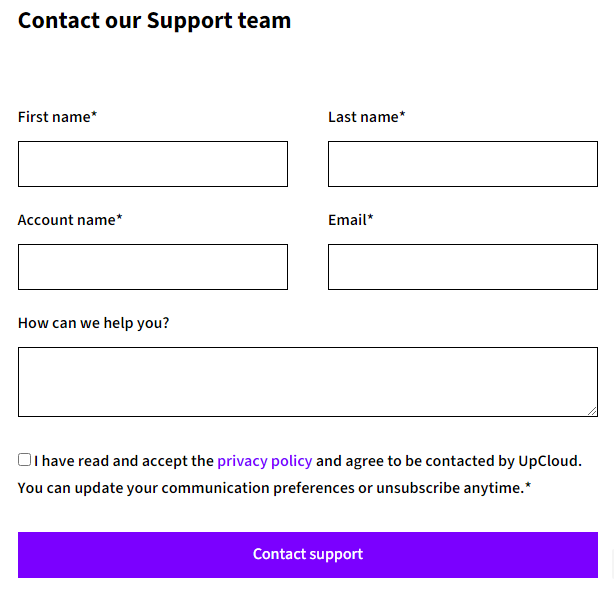
3. Click Contact Support
Method-3
It can be quite easy to do that. Just type your account removal message and send it to support@upcloud.com. Don’t forget to send it through your registered email address.
Upcloud Alternative Free Trials
Kamatera
Since 1995, the behemoth has been known for its enriched cloud infrastructure, which provides highly resourceful cloud products with ironclad security, a 99.95% uptime guarantee, and 24×7 live chat support for bloggers, SaaS start-ups, and SMBs at affordable prices.
You can test the platform for free for 30 days at any of their 18 global data centers. You can find 100+ one-click apps to launch your website on WordPress, Drupal, Joomla, and other platforms, as well as a free CyberPanel to manage web properties.
IONOS
The European host offers unmetered VPS service with pricing starting at $2 and 7 ISO 27001-certified data centers around the world. Data is stored in a 100% SSD SAN storage environment with full virtualization, resulting in high efficiency and performance. They invite you to try them out for 30 days for $2.
How to Get a Refund From Upcloud
Obviously, they can’t allow the withdrawal of account credit but provide a 30-day money-back guarantee on the first payment. You can create a ticket to get a refund.
Upcloud in a Nutshell
UpCloud bills itself as the fastest cloud server in the world. They have used MaxIOPS for storage, a next-generation storage technology that is significantly faster than a standard SSD.
With their InfiniBand network, which has been used in supercomputers since 2012, you can target any audience in any part of the world and ensure faster TTFB.
They also guarantee an SLA of 100% uptime; otherwise, you can claim a 50x payback for any downtime lasting more than 5 minutes.
A firewall protects the servers, and two-factor authentication is used for user accounts. Furthermore, customer data is protected in accordance with EU and Finnish law. The worry may bother you on another cloud host, but it is concerned about your data.
Paying charges adheres to the “pay as you go” model, which is a modest payment model. In addition to email support, they now provide live chat support, which is uncommon on cloud platforms.
FAQ
1. How can I delete my UpCloud account quickly and safely?
You can delete your UpCloud account in three simple ways. The easiest method is to log in to your dashboard, click the chat icon, and send a request asking the support team to remove your account. They usually respond within a short time and process the deletion after confirming your identity.
2. Can I delete my UpCloud account through email?
Yes, you can. Simply write a short request asking for permanent account removal and send it to support@upcloud.com. Just make sure you send the message from the same email address that is linked to your UpCloud account. This helps them verify ownership instantly.
3. Is there another way to request account deletion without live chat?
Absolutely. You can visit the UpCloud support page, fill out the contact form, and paste your account removal message there. After submitting the form, the support team will reply with confirmation and guide you through the final steps if needed.
4. Does deleting my UpCloud account stop all future charges?
Yes, but only after your account is fully closed and all active resources are deleted. If you keep servers, backups, or storage running, charges can still occur. This is why it is important to remove all services before requesting account deletion. After that, you are completely safe from unwanted billing.
5. Can I get a refund before deleting my UpCloud account?
UpCloud offers a 30-day money-back guarantee on your first payment. If you are eligible, you can open a support ticket and request a refund. However, credit already added to your account cannot be withdrawn. It is only refundable if it was part of the first payment.
6. What are good alternatives to UpCloud if I still need a VPS?
You can test Kamatera for 30 days with a free $100 credit, which includes enterprise-grade servers, 18 global data centers, one-click apps, and full live chat support. Another solid choice is IONOS, which offers unmetered VPS service starting at $2 and also gives a 30-day trial. Both options are excellent if you want stable performance and strong support.
7. Is UpCloud a reliable platform if I ever want to come back?
Yes, UpCloud is known for its strong infrastructure. They use MaxIOPS storage, which is much faster than traditional SSDs, and their InfiniBand network ensures very low latency worldwide. They also offer a 100 percent uptime SLA with a 50x payback if downtime exceeds five minutes. With strong security, two-factor authentication, and strict EU data protection laws, UpCloud remains a trusted option in the cloud industry.
More Account Cancellation Guide
- How to Delete Hetzner Account & Get Refund Easily
- How To Delete Scalacube Account + Get Instant Refund
- How to Delete Netcup Account & Get Refund Easily
- How To Delete Vultr Account & Get A Fast Refund
- How to Delete DigitalOcean Account Easily + Get Refund
- How To Delete Linode Account + Get An Instant Refund
- How to Delete IONOS Account & Get Refund Easily
- How to Delete Contabo Account & Get Refund Easily

Ravi Kumar is a Server Performance Analyst with over 4 years of experience benchmarking cloud infrastructure. He has optimized and stress-tested over 150+ websites, digging deep into uptime, disk latency, and CPU performance. Whether you’re looking for a free trial or a high-performance production server, Ravi uses real-world data to help you find the perfect host.
UpCloud in a nutshell section was pretty handy. Always looking for concise overviews without the fluff. Thanks for keeping it straightforward, Ravi.
Agreed, Jen. It’s refreshing to get the info you need without having to dig through paragraphs of extra.
I’m curious about the refund policy from UpCloud. Does the process work smoothly for everyone, or are there hoops to jump through? Got a bit anxious reading about it, wondering if I ever decide to leave, what’s the ordeal I’d be facing.
Seriously, why’s it gotta be so complicated to delete an account with these services? Felt like I needed a guide for the guide lol. Anyway, this helps, but man, UpCloud really should streamline this process. Anyone else find it more difficult than it should be?
Great list of alternatives, Ravi. I’ve been on the fence about moving away from UpCloud due to their pricing model, and seeing options like Kamatera and IONOS laid out with the prospects of free trials is super helpful. Has anyone had any specific experiences with these providers they’d be willing to share? Looking for reliability and customer service insights before making the jump. Cheers.
Hey Ravi, appreciate the guide on deleting an UpCloud account. Quick one – after deleting, how soon does it take for all data to be permanently erased from their servers? Just want to be sure about data retention policies. Thanks!
From what I’ve read, cloud services usually take a bit to fully erase data for safety reasons. Would also be interested if the article touched on UpCloud’s specific policies!
That’s a good point, Kris. Hopefully, Ravi can shed some light on this.