9 Free VPS Trials (2026): No Credit Card & Tested

Are you a tech student, developer or an online business onwer and looking for a VPS to learn how servers work or test vps performance before upgrading your current hosting?

Then, testing a VPS with free trial is a smart step. But you know, renting a server costs.
So before investing your hard-earned money, by digging a free server, you can explorer their power, infrastructure, security, reliability and support.

But figuring out a best one can consume a lot of time for you. So my team has tested over 20 server platforms and filter out best 9 VPS as per their performance and free trial terms. Some of them offer free VPS with no credit, but others require.

Let’s dive into the post.

Table of Contents

⏰ In Hurry? Check Out the Best Free VPS Trial Offers →

Best Performance
Kamatera
9.5
  • Free 30-Day Trial With $100
  • Linux & Windows RDP & VPS
  • Enterprise-Grade Infrastructure 
  • 100+ 1-Click Apps
  • Firewall & Disaster Recovery Management
  • 24/7 Live Chat Support
Beginner Friendly
VPSServer
9.1
  • Free 30-Day Trial with $100 
  • Business-Grade Infrastructure 
  • 40+ 1-Click Apps 
  • Linux & Windows VPS & RDP
  • Daily Backup
  • 24/7 Phone Support 
Managed VPS
cloudways
9
  • Top 5 Cloud Platforms At A Place 
  • Free Object Cache Pro For Optimum Caching 
  • Cloudflare Enterprise CDN 
  • 1-Click WordPress, Drupal & Joomla Apps
  • 24/7 Flexible Support 
  • Free Trial with $100 without CC 

See 6 More Great ChoicesFAQ

VPS Free Trials Credit Card Required (Production-Grade)

These platforms provide full-featured VPS trials. A payment method is required for verification, but no charges apply if usage stays within credits.

Provider Free Trial / Credits Typical Trial Resources* Credit Card Required Best For
Kamatera 30 days with $100 credit Customizable VPS (usage-based) Yes Developers and businesses testing production-grade VPS
VPSServer 30 days with $100 credit Flexible VPS resources based on selected plan Yes Short-term testing and regional performance checks
Vultr $100 credit (30 days) VPS size depends on chosen instance Yes Developers deploying scalable apps globally
DigitalOcean $100 credit (30 days) Droplets based on selected plan Yes (or PayPal deposit) Developers building and scaling cloud applications
Linode (Akamai) $100 credit (30 days) Compute instances based on selected plan Yes Developers and startups seeking predictable pricing

Free VPS No Credit

These options allow testing without adding payment details. Most are managed platforms or student programs with limited resources.

Provider Free Access Type Typical Free Resources* Credit Card Required Best For
Cloudways 3-day free trial Managed VPS (≈2 vCPU, 4 GB RAM on entry plans) No Beginners and businesses wanting managed cloud hosting
AccuWeb Cloud 30-day free trial with credits Entry-level managed cloud resources No Users testing managed VPS without billing setup
Microsoft Azure (Students) 12 months student free tier Limited VM sizes under free tier No (student accounts) Students learning Linux and Windows cloud servers
Google Cloud (Students) 12 months student free tier e2-micro class VM (very limited) No (student accounts) Students exploring Google Cloud infrastructure

What Is a Free VPS?

A VPS (Virtual Private Server) is a virtualized environment created from a physical server. A single physical server can host multiple VPS instances, each operating independently.

A simple way to understand this is:

  • The physical server is a building
  • Each VPS is a separate apartment

Every VPS has its own CPU allocation, RAM, storage, operating system, and network resources, providing isolation, security, and customization.

Behind the scenes, VPS platforms use virtualization technology to divide a dedicated server into multiple independent virtual environments.

Why Use a Free VPS or VPS Free Trial?

A free VPS or VPS free trial allows users to test server environments without immediate cost. This makes it useful for several purposes:

1. Full Control Testing

Many VPS free trials provide full root or administrator access. This allows users to:

  • Install Linux or Windows operating systems
  • Deploy control panels like CyberPanel
  • Test applications such as WordPress, Docker, or databases

2. Hosting Upgrade Evaluation

If you are considering upgrading from shared hosting, a VPS free trial lets you:

  • Measure real performance
  • Compare stability and response times
  • Decide whether VPS hosting fits your needs before paying

3. Learning and Practice

Free VPS options are commonly used by:

  • Students learning Linux commands
  • Developers experimenting with containers or orchestration tools
  • Users practicing server administration without financial risk

4. Testing and Experimentation

For technical users, free VPS access enables:

  • Application testing
  • Regional performance checks
  • Short-term development environments

Why Do Most Free VPS Offers Require a Credit Card?

Many VPS providers require a credit card for free trials for practical reasons:

  • To reduce spam and automated abuse
  • To prevent resource misuse
  • To verify genuine users
  • To enable smooth upgrades to paid plans if needed

This does not mean you will be charged, as long as you stay within the trial limits and cancel unused resources.

Who Should Choose What?

1. VPS Free Trials

Best for developers, startups, businesses, and users needing full performance for short-term evaluation.

2. Free VPS / Free Tier

Best for students, learners, and long-term experimentation with limited workloads.

How To Choose Best Free VPS Providers

  • Understand the type of free VPS
    Some providers offer limited-time free trials with full power, while others give always-free but low-resource servers. Choose based on how long and how seriously you want to test.
  • Match the VPS with your purpose
    Learning Linux, testing apps, or running a demo site all need different CPU, RAM, and storage. Don’t overpay or over-test resources you won’t use.
  • Check resources and hidden limits
    Always review CPU cores, RAM, SSD size, bandwidth, and any throttling rules. Free VPS plans often restrict performance during high usage.
  • Review signup requirements and terms
    Some free VPS trials require a credit card, others don’t. Also check auto-billing, cancellation rules, and data retention policies before signing up.
  • Choose trusted and well-reviewed providers
    Established cloud providers offer better uptime, documentation, and reliability. Avoid “too good to be true” free VPS claims with no clear terms.

1. Kamaterakamatera enterprise cloud vps

Overall Rating Feature Performance Reliability User-friendly Support Pricing
9.5 9.2 9.8 9.8 9.3 9.2 9.5

Since 1995, Kamatera has been serving in the cloud and now they are one of the leading companies. As they provide enterprise-grade VPS with 30-day trial. We tested them.

Hands-on Test (Real Experience)

To understand how Kamatera’s free VPS trial performs in real usage, we activated the 30-day trial with $100 credit and tested it like a real user would.

Well, it was not a demo account. Actually it was a full account and ready for production. However, they charge $1 to check our payment method and refund it instantly.

How We Tested Kamatera Free Trial

Test Setup

Server type: Availability
OS: Ubuntu 22.04
Location: New York, US
1 vCPU
1 GB RAM
20 GB SSD
Trial credit used: $4 (well within $100 limit)
Setup took less than 5 minutes from signup to server access.

Performance Stats During Test

Their one core 2.7 GHz Intel Xeon Platinum chip & 1 GB DDR5 RAM powered servers took only 22 ms to respond (TTFB) and maintained near-perfect uptime (100% in our test).

TTFB FCP LCP Uptime
22 ms 402 ms 548 ms 100%

Detailed Analysis

Feature – Kametera VPS consists of DDR5 RAM, NVMe SSD and 10 Gbps port speed. Their clean and intuitive dashboard features one-click snapshot, weekly backup, docker apps.

Performance – Their entry-level vps’s performance was exceptional. It has shown great power to launch any production application.

TTFB FCP LCP Uptime
22 ms 402 ms 548 ms 100%

Reliability – Their enterprise-grade VPS comes with 99.95% uptime guarantee. However, in our test, they have achieved 100% uptime. They alos N+1 server configuration to cope up any misfortunate happenings.

User-friendly – You can deploy your server in 60 seconds with the beginner friendly dashboard. Not that one, the dashboard is full of 100+ one-click apps, 24 global data centers, multiple linux and Windows OS.

Support – When it comes to support, Kamatera is miles ahead from their competitors. Their expert support team is ready around the clock via phoen, live chat and email.

Pricing – Their plan start from $4 per month that makes them one of cheapest cloud platform. It’s available with full root access.

What You Actually Get During the Free Trial

Here’s what stood out during testing:

Pros
  • Full root access
  • Real SSD-backed performance
  • Stable uptime during testing
  • No artificial throttling
  • Same infrastructure as paid users
  • 24 global data centers
  • Linux & Windows OS
  • 24/7 Flexible Human Live Chat, Ticket & Call Support
Cons
  • Managed Service at a high cost
  • No SSH

We were able to:

  • Install packages freely
  • Deploy a WordPress test site
  • Run basic load tests
  • Restart and resize the server

This confirms Kamatera’s trial is a true production-grade VPS, not a limited sandbox.

Important Limitations You Must Know

This is where many users get confused, so let’s be clear:

  • Credit card is required to activate the trial
  • Trial is credit-based, not time-only
  • Overuse can consume credits quickly
  • Abuse or policy violations can trigger suspension

If you deploy large instances or forget to shut down servers, your $100 credit can be exhausted before 30 days.

What Kamatera Free Trial Is NOT Good For

Based on testing and platform policies, Kamatera’s trial is not suitable for:

  • Crypto mining
  • Heavy automation abuse
  • Long-term production hosting
  • Reselling services
  • High-traffic commercial workloads
  • The trial is clearly designed for evaluation and testing, not free long-term hosting.

Who Should Use Kamatera Free Trial

This free VPS trial is ideal for:

  • Developers testing cloud performance
  • WordPress users benchmarking speed
  • SaaS founders validating infrastructure
  • Users comparing VPS providers before paying

If you want real VPS experience before committing, Kamatera is one of the strongest options available in 2026.

2. VPSServerVPSServer2

Overall Rating Feature Performance Reliability User-friendly Support Pricing
9.1 8.5 9 9.8 9 8.9 9.5

VPSServer is a cloud VPS provider that offers multiple server options, including Linux VPS, Windows Server, RDP servers, and Forex VPS. Their infrastructure is designed to support both personal projects and professional workloads.

The platform provides NVMe SSD storage, a global network of data centers, and relatively high network throughput, making it suitable for users who want flexibility across regions.

Performance Observations

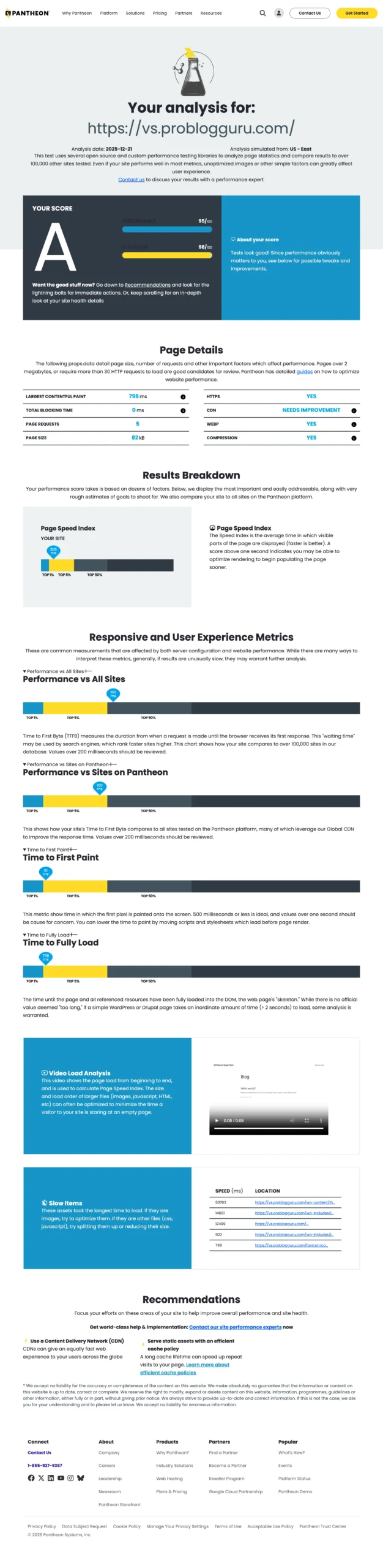
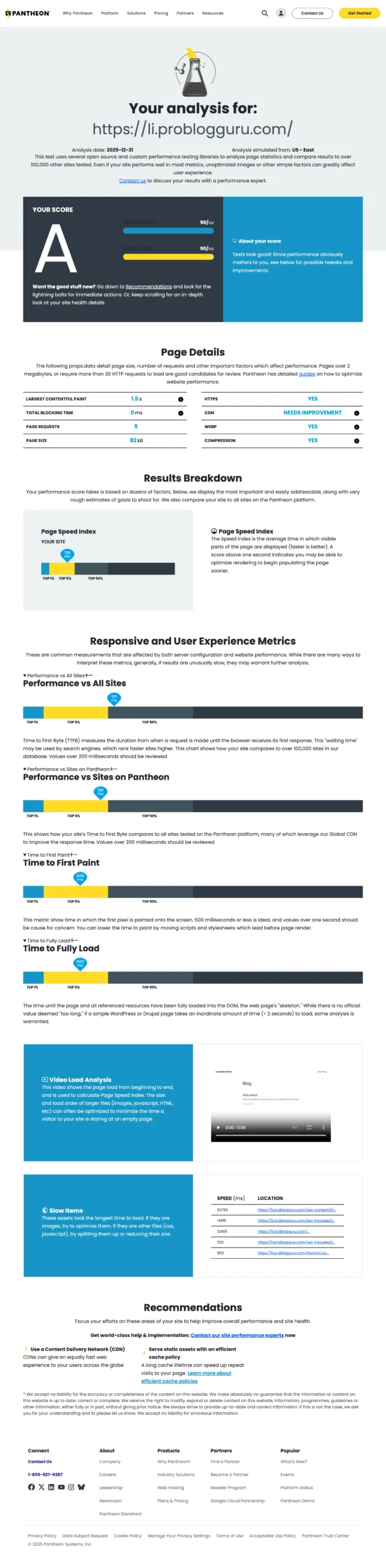
During the starter VPS testing, we observed the following average metrics:

TTFB FCP LCP Uptime
51 ms 798 ms 1 s 100%

These results indicate stable entry-to-mid-level performance, suitable for development, testing, and small production workloads.

Free Trial Availability

VPSServer offers a 30-day free trial with up to $100 in usage credit. This allows users to test the platform before committing to a paid plan.

Note: The trial is credit-based, so resource usage directly affects how long the trial lasts.

Detailed Analysis

Feature – You can deploy complex application with power of 40 Gbps ports, 24 data centers, 128 GB RAM, and 32 vCPU. Managed service is also available.

Performance – As their servers are powered by latest tech infrastructure, that handled stress testing efficiently and carried out top-notch uptime in our test.

Reliability – In our test, their uptime was above than their 99.95% uptime guarantee. Apart from that, their cloud firewall ensures smooth running of servers.

User-friendly – It includes 40+ one-click application installers, which simplify deployment for common use cases such as web hosting, application testing, and server management. This is helpful for users who prefer faster setup without extensive manual configuration.

Support – Customer support is available 24/7 via phone and email.
Response times during testing were reasonable, and issues related to provisioning and billing were handled without escalation.

Pricing – Their pricing is budget friendly which starts at $4 per month and goes to $1098 / month.

Pros & Cons

Pros
  • Business-grade infrastructure
  • Intel Xeon processor
  • NVMe SSD storage
  • 20+ global data center locations
  • 40+ one-click applications
  • Flexible scaling options
  • 24/7 phone and email support
  • Predictable monthly billing
Cons
  • SSH key management options are limited compare to some competitors
  • Trial usage must be monitored closely to avoid exhausting credits early

Who VPSServer Is Good For

  • Developers testing VPS performance across regions
  • Users who want a 30-day VPS free trial before paying
  • Small businesses running moderate workloads
  • Projects that benefit from quick deployment tools

It may not be ideal for users who require advanced SSH key workflows or unmanaged long-term free hosting.

3. Cloudwayscloudways credit button

Overall Rating Feature Performance Reliability User-friendly Support Pricing
9 8 9 9.4 9.2 8.2 8.2

Cloudways is a managed VPS hosting platform that simplifies access to major cloud providers such as AWS, Google Cloud, Vultr, Linode, and DigitalOcean. Instead of managing servers directly, users deploy applications through Cloudways’ management layer.

Performance Observations

TTFB FCP LCP Uptime
93 ms 1.1 s 1.5 s 99.92%

Performance is consistent for managed workloads, especially CMS-based sites.

Platform Experience

  • One-click application deployment (WordPress, PHP apps, etc.)
  • Server configuration and optimization handled automatically
  • Optional integration with Cloudflare Enterprise for improved global latency and security
  • Built-in Object Cache Pro for application-level caching
  • Cloudways offers a 3-day free trial with no credit card required, which is sufficient for basic evaluation but limited for deeper testing.

Detailed Analysis

Feature – It is a roof of world’s leading cloud platform like AWS, GCP, Vultr, Linode and DigitalOcean which comes with autonomous managed service. You can diverate your full energy on your core business, by handing over your server accountability to cloudways. It also offers Cloudflare enterprise CDN + security, free object cach pro and over 50 data centers.

Performance – On standard level, their entry-level server performed well. Uptime was reliable throughout the 30-day except minor down time due to stress testing.

Reliability – Cloudways offer 99.99% uptime and world class server security.

User-friendly – Launching a server take merely 40 seconds, you need to do some clicks. Their expert script automatically get your server ready for you.
Their dashboard is clean and quit, beginners really like it.

Support – Under the dashboard, you can start live chatting with their support team around the clock. However, ticke support and documentation are also available.

Pricing – VPS alone is cheap, by adding managing layer is a bit expensive. However, in compare to managed VPS industry, Cloudways cares your pocket.

Pros & Cons

Pros
  • Managed hosting experience
  • Access to multiple cloud providers
  • Free site migration
  • Pay-as-you-go billing model
  • Built-in security and monitoring
  • 24/7 ticket-based expert support
Cons
  • Very short free trial period
  • Limited server-level control compared to unmanged vps

4. Vultrvultr

Overall Rating Feature Performance Reliability User-friendly Support Pricing
8.5 8.5 9.2 9.5 9 7.5 8.2

Vultr is a well-known cloud infrastructure provider offering high-frequency VPS instances, NVMe storage, and a wide global data center footprint.

Performance Observations

TTFB FCP LCP Uptime
88 ms 1 s 1.5 s 99.96%

The platform delivers strong and predictable performance, suitable for developers and production workloads.

Free Trial & Features

  • 30-day free trial (credit-based)
  • Multiple Linux and Windows OS options
  • Optional GPU instances for compute-intensive tasks
  • Built-in DDoS protection
  • Extensive documentation and tutorials

Detailed Analysis

Feature – Vultr is best for AI engineers, ecommerce owners, and gamers. It has cloud GPU, dedicated CPU and bare meta. They also cater low-budget project by offering shared CPU. Their servers are available with 32 data centers, AMD and Intel chips.

Performance – Their starter plan has done quiet nice in our test. Their stability was up to mark in the stress testing.

Reliability – All their plans comes with bundle of 100% uptime SLA, cloud firewall, daily offsite backup, and DDoS protection.

User-friendly – They have high tech products to offer, but they have built a simple, clean and intuitive dashboard. From a newbie to expert can deploy the app smoothly.

Support – Ticket support is one single support channel. I have tested, they respond quickly with genuine solutions. They really hire expert team of server engineers.

Pricing – As the cloud platform offers dual chips, GPU, NVMe SSD, so the plan pricing goes little high. But I find, it’s reasonable.

Pros & Cons

Pros
  • High-performance VPS infrastructure
  • Latest Intel and AMD chips
  • 32 global data centers
  • NVMe SSD storage
  • GPU server availability
Cons
  • Support primarily handled via tickets

5. AccuWeb Cloudaccuweb cloud free trial

Overall Rating Feature Performance Reliability User-friendly Support Pricing
8 7 9 8 9 7.5 8.5

AccuWeb Cloud provides enterprise-grade VPS and cloud hosting services with a focus on affordability and guided setup. It offers a 30-day free trial with usage credits.

Performance Observations

TTFB FCP LCP Uptime
97 ms 1 s 1.3 ms 99.88%

Performance is adequate for managed applications and testing environments.

Free Trial Details

  • 30-day free trial with $100 usage credit
  • No billing details required to start
  • Choice of multiple products (Cloud VPS, WordPress, PHP apps, databases)
  • Data centers in New York, Los Angeles, Frankfurt, and Chennai

Detailed Analysis

Feature – It has only 4 data centers equipped with AMD EPYC and NVMe SSD where you can deploy not only cloud VPS but also database, storage and PaaS with 10 Gbps network speed and free migration.

Performance – They entry-level vps passed core web vitals score. Web page speed lover can confidently choose it.

Reliability – You will get standard 99.95% uptime with firewall, DDoS Protection, 7-day snapshot, and full recovery point.

User-friendly – Their dashboard seem a bit clutter with full of 100+ one-click apps and Web SSH terminal.

Support – There are two support channels available – ticket system and phone call. Their support team is indian based.

Pricing – Their smallest plan starts from $1.80 per month which goes to $359 per month. The pricing is pocket friendly. It is the best fit for serve learners.

Pros & Cons

Pros
  • Managed VPS environment
  • Free migration
  • 100+ one-click applications
  • Managed databases
  • Storage and backup options
  • Auto-scaling support
  • 24/7 support
Cons
  • No public IP by default
  • Limited custom SSL options

6. DigitalOceanDigital Ocean Sign Up 1

Overall Rating Feature Performance Reliability User-friendly Support Pricing
7.4 9.2 9.8 9.8 9.3 9.2 9.5

DigitalOcean is known for its simple interface and developer-friendly experience, making it a popular choice for first-time cloud users.

Performance Observations

TTFB FCP LCP Uptime
131 ms 1 s 1.1 s 99.95%

Servers performed reliably during testing, with consistent response times.

Free Trial & Usage

  • 30-day free trial with credit card verification
  • Alternatively, users can add a minimum balance via PayPal
  • Premium droplets available with faster NVMe storage and AMD CPUs

Detailed Analysis

Feature – DigitalOcean is verstiled platform where you can get various kinds of VPS like memory-optimized, CPU optimized, storage optimized, GPU, and basic. You’ll get option to choose NVMe or standard SSD, and Intel or AMD.

Performance – Their 1-core VPS was fast in TTFB, smoother in FCP and LCP.

Reliablity – The cloud platform offers 100% uptime SLA. Manual firewall, backup and snapshot are available under the dashboard.

User-friendly – They’ve curated one of most beginner friendly dashboard. I always admire it. Under the dashboard, you can execute any process without any hurdle and confusion.

Support – Their weak support should be main concern. When you contact them over any issue, they don’t solution and reply with pre-templated answers. it’s quite frustrating.

Pricing – Pricing starts from $2.5 per month which is great for a beginners.

Pros & Cons

Pros
  • Beginner-friendly dashboard
  • 15 global data centers
  • NVMe SSD storage
  • Multiple Linux OSes
  • Built-in DDoS protection
Cons
  • No Windows VPS
  • No daily backup on basic plans
  • Support primarily ticket-based

7. Linode (Akamai)Linode Free Trial

Overall Rating Feature Performance Reliability User-friendly Support Pricing
9.5 9.2 9.8 9.8 9.3 9.2 9.5

Linode, now part of Akamai, is a mature cloud platform serving developers, startups, and businesses with scalable cloud infrastructure.

Performance Observations

TTFB FCP LCP Uptime
130 ms 1.2 s 1.5 s 99.27%

Performance is stable and suitable for most application workloads.

Free Trial Details

  • $100 free credit valid for 30 days
  • Requires linking a payment method (credit card, PayPal, or Google Pay)
  • One-click application deployment available
  • Built-in DDoS protection and cloud firewall

Detailed Analysis

Feature – Linode aka Akamai distributes their server power as essential compute, app platform, GPU, Kubernetes engine, managed database, object storage. They have also networking products like NodeBalancers, DNS manager, and private networking.

Performance – The server performed quite well. The test records surpass Google’s core web vitals.

Reliablity – Like other big cloud platform, it comes with 99.99% uptime SLA. Manual firewall and snapshot can keep your back.

User-friendly – 100+ one clicks app and mutl-linux OS available under their newbie friendly dashboard.

Support – Ticket channel is only one where you can seek solution for your server issue.

Pricing – Pricing starts from $5 per month. A starter will be happy to start their cloud journey from here.

Pros
  • 15 global data centers
  • Flexible monthl billing
  • 99.99% uptime SLA
  • Free DDoS protection
  • Daily backups
Cons
  • No Windows VPS
  • Ticket based support only

Free VPS Forever (Realistic Expectation)

There is no truly unlimited free VPS from major cloud providers. However, students can access long-term free resources through educational programs.

8. Microsoft Azure Student PackMicrosoft Azure

Overall Rating Feature Performance Reliability User-friendly Support Pricing
9.5 9.2 9.8 9.8 9.3 9.2 9.5

Microsoft Azure offers a student free tier that provides cloud resources for learning purposes, available for up to one year with academic email verification.

Performance Observations

TTFB FCP LCP Uptime
135 ms 1 s 1.5 ms 99.20%

Detailed Analysis

Feature – The mammoth is enterprise-grade plethora of 200 products like AI+ machine learning, app development, compute, database + analytics, hybrid + multicloud etc.

Performance – Performance stats is above than standard.

Reliablity – It is built on a globally redundant infrastructure with multiple availability zones, ensuring high uptime and fault tolerance.

It’s enterprise-grade SLA, automated failover and continuous monitoring make Azure one of the most reliable cloud platforms for mission-critical workloads.

User-friendly – As an experience developer, you will enjoy to deploy your app under their dashboard. You can optimize your app bit by bit by using toos available. A newbie definitely find difficulties.

Support – Ticket system is single and you can also azure community for yoru issue.

Pricing – Pricing is quite expansive, 1 core CPU + 25 GB SSD + 1 TB plan costs you $79.59 per month.

Pros & Cons

Pros
  • Linux and Windows VPS access
  • Integration with Azure ecosystem
  • Suitable for learning Windows server
  • Enterprise-grade global infrastructure
Cons
  • Limited resources
  • Additional costs for public IPs, storage and bandwidth

9. Google Cloud Student Packgoogle cloud

Overall Rating Feature Performance Reliability User-friendly Support Pricing
9.5 9.2 9.8 9.8 9.3 9.2 9.5

Google Cloud provides a student free tier that includes limited VPS resources for learning and experimentation.

Performance Observations

TTFB FCP LCP Uptime
130 ms 1 s 1.5 s 99.19%

Detailed Analysis

Feature – Google cloud has 150 + enterprise-grade ready products including AI & machine learning, compute, storage, databases, data analytics, networking, developer tools, security and startup tools.

Performance – Their server performance was upto mark and passed the core web vitals benchmark.

Reliablity – It is built on a global, redundant infrastructure designed to keep your applications running without interruption.

User-friendly – Dashboard is built for developer to manage enterprise-grade apps. Newbie will need follow a learning curve.

Support – Ticket system is only channel.

Pricing – Its pricing is quite high. Its plan starts with $6.88 per month and goes $480.09 with bandwidth.

Pros & Cons

Pros
  • Strong global infrastructure
  • High reliablity and security
  • Integration with Google services
  • Fast DNS
Cons
  • Very limited VPS resources
  • Performance constraints, especially RAM and disk I/O
  • Idle instances may be reclaimed

The Myth of “Unlimited Free VPS Forever”

Claims such as “unlimited free VPS forever” are misleading.

Running servers involves real costs:

  • Hardware
  • Power
  • Bandwidth
  • Data centers
  • Ongoing support

Because of this, no reputable provider offers unlimited resources for free indefinitely.

The Reality

  • Free VPS / Free Tier → Long-term but very limited resources
  • VPS Free Trial → Full performance but time-limited
  • Paid VPS → Full resources with guaranteed stability

Any website promising unlimited VPS power forever should be approached with caution.

Free VPS Scams & Risks (What to Watch For)

When searching for free VPS options, be aware of warning signs:

Common Red Flags

  • Promises of unlimited CPU, RAM, or bandwidth forever
  • Requests for unnecessary personal documents
  • Forced downloads or unknown software
  • No clear company information or support channels

How to Stay Safe

  • Check provider reputation on forums and Reddit
  • Prefer established cloud platforms
  • Follow the rule: if it sounds too good to be true, it probably is

How to Optimize a Free VPS or Free Tier

Free VPS and free-tier servers usually have limited resources. To get the best experience:

  • Use lightweight operating systems (Debian, Alpine, Ubuntu Minimal)
  • Avoid heavy control panels
  • Enable basic security (firewall, Fail2Ban)
  • Use free VPS mainly for testing and learning

FAQ

1. What is a free VPS?

A free VPS is a virtual private server that users can access either through a free tier or a limited-time trial. It allows you to use a VPS environment with restricted resources or for a limited duration, depending on the provider’s policy.

2. Is a free VPS the same as a VPS free trial?

No.

  • A free VPS or free tier usually offers limited resources but can last long term.
  • A VPS free trial provides full or near-full performance but is available only for a short period, such as 7 to 30 days.

3. Can I get a free VPS without a credit card?

Yes, but options are limited. Some managed platforms and student programs allow free VPS access without a credit card. However, most production-grade VPS trials require a payment method for verification.

4. Why do most VPS free trials require a credit card?

VPS providers require a credit card to:

  • Prevent spam and automated abuse
  • Ensure fair resource usage
  • Verify genuine users
  • Allow smooth upgrades to paid plans

You are not charged if you stay within the trial limits and shut down unused resources.

5. Is a free VPS safe to use?

A free VPS is safe if it comes from a reputable provider. Always avoid platforms that promise unlimited resources forever or ask for unnecessary personal information.

6. What can I use a free VPS for?

Free VPS and free trials are commonly used for:

  • Learning Linux and server administration
  • Testing websites and applications
  • Evaluating VPS performance before upgrading
  • Running short-term development or staging environments

They are not recommended for long-term production workloads.

7. What are the limitations of free VPS services?

Common limitations include:

  • Restricted CPU, RAM, or storage
  • Time-limited access (for trials)
  • Usage caps or credit limits
  • Limited support for free users

These limits exist to control costs and prevent misuse.

8. Is there any truly unlimited free VPS forever?

No.
There is no legitimate provider offering unlimited CPU, RAM, and bandwidth for free forever. Running servers involves hardware, power, bandwidth, and support costs.

9. Who should choose a VPS free trial instead of a free tier?

A VPS free trial is better for:

  • Developers and startups
  • Businesses testing performance before migrating
  • Users needing full resources temporarily

A free tier is better for students and long-term learning with limited workloads.

10. How can I get the best performance from a free VPS?

To optimize a free VPS:

  • Use lightweight operating systems (Debian, Alpine, Ubuntu Minimal)
  • Avoid heavy control panels unless necessary
  • Enable basic security (firewall, Fail2Ban)
  • Use it mainly for testing, learning, or short-term projects

135 thoughts on “9 Free VPS Trials (2026): No Credit Card & Tested”

  1. Seeing ‘Unlimited Free VPS Forever is the Myth’ really burst my bubble. And here I was, planning to tell my wife that we won’t have to pay for hosting ever again. Guess I’ll have to stick to presenting her with the budget review next month instead. On a serious note, thanks for the clarity. It’s easy to get lost in the technical jungle without a good guide. Your article definitely shed some light on the path for a non-tech savvy person like me.

    Reply
  2. Just wanted to drop a note saying thanks for this list! I’ve been on the lookout for free VPS options to test out for my blog about online tools, and your article is just what I needed. It’s super overwhelming to see so many tech options out there, but you broke it down super simply. Gonna try Cloudways first, heard a lot of good stuff about them but was always hesitant to give my card info. It’s awesome to know there are trials that don’t need it. Keep up the great work, Ravi Kumar!

    Reply

Leave a Comment

//