DigitalOcean is the best when it comes to ease of use. An elegantly designed dashboard with ample features like 100+ one-click apps makes beginners’ lives easier. A newbie can not only host a website but also install a VPN with a click.
Their server resource quality is a stunner, as their entry-level plan was superbly performed in an independent test. Their TTFB was 131 ms, and their uptime was 99.96%.
You can enhance the performance by just opting for their NVMe VPS plans, which also come with premium AMD and Intel processors.
They love you to test out their servers for free. Therefore, they provide a 60-day trial offer with a $200 credit.

Table of Contents
Unlock 5x More Performance
Sign up now for DigitalOcean Free Trial and get →
Coupon code: Auto-applied in the button below.
Be very careful with the DigitalOcean Free Trial:
Lately many users have complained about gruesome mismanagement of DigitalOcean, like unauthorized charges, data loss, false suspension, sluggish bot support, and data breaches.
Users got suspended accounts, even with having a valid credit card. Over the top, after suspension, some users got charged.
Some got Fortune 500 companies killed. They lost the entire server. Bitterly, a 7-year user lost over £150,000 worth of data. The user had to wait over 16 hours for a support response during critical outages.
Better yet, Kamatera is a great DO alternative for reliable enterprise-grade performance, 24/7 live chat support, disaster recovery management, daily backup, and 100+ 1-click apps.
So we recommend Kamatera instead; otherwise, use it at your own risk.
How To Claim DigitalOcean Free Trial
Looking for cloud hosting with zero commitment? DigitalOcean’s free trial gives you $200 in credits for 60 days—enough to run 10 cloud VPS (aka Droplets), launch 100+ one-click apps, and test premium NVMe SSD servers.
Perfect for devs, students, and startups to host websites, deploy VPNs, test apps, or run Docker containers. With top-tier AMD/Intel CPUs, blazing-fast DNS, and 99.96% uptime. This is a test ride worth taking.
Grabbing the DigitalOcean free trial offer is like eating butter cake. The whole process will be done in 2 minutes.
1. Visit Digital Ocean trial page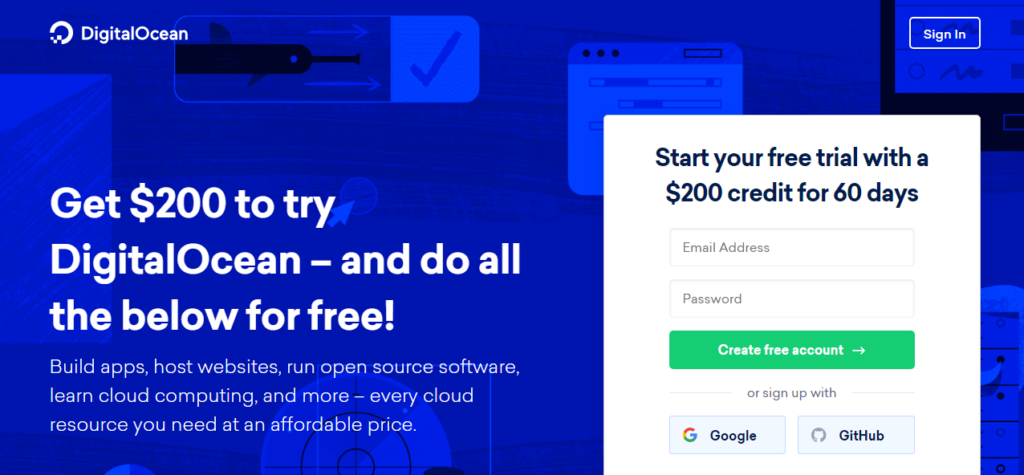
2. Put down your email address and password in the sign-up box. Hit create free account.
3. Go to your inbox, find the confirmation mail, and click the confirmation link to validate your email address.
4. You can add your PayPal account, which will require a transaction of at least $5. The payment of $5 will be used after a 60-day trial period. 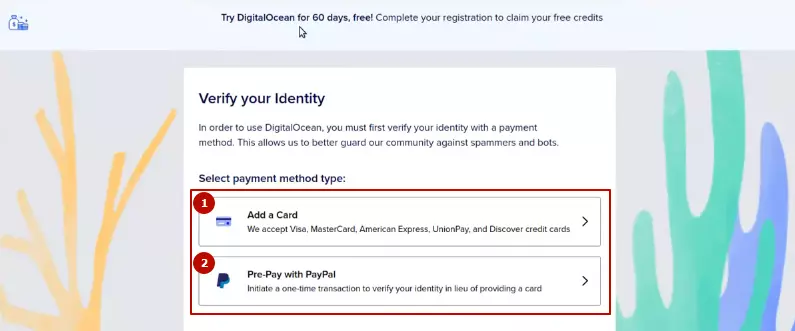 Don’t want to pay anything? Link your card.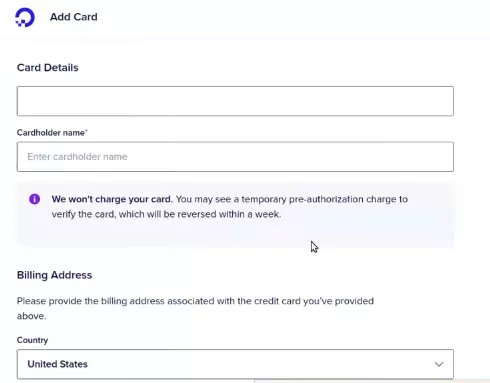
5. Enter your billing address.
6. You will be redirected to the PayPal payment page, where you can pay $5. (If you had opted for Paypal.)
7. Now your account is fully activated.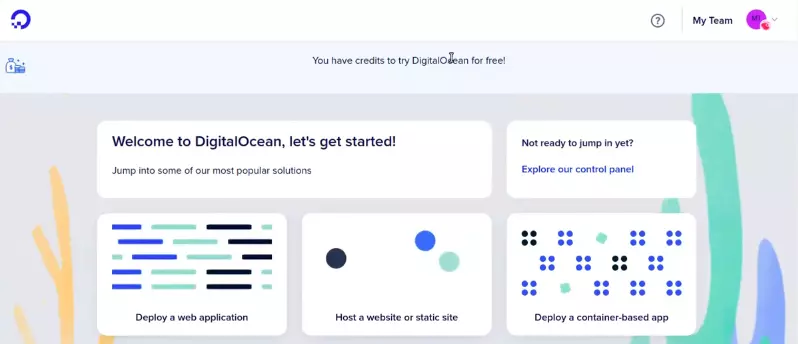
What Resources Will You Get
DigitalOcean doesn’t restrict any service during the trial. Users are free to use, test, and deploy their applications on any of their products.
- 10 Droplets
- Cloud Firewall
- Unlimited IPv4 and IPv6
- Free Superb DNS Management
- Daily Backup
- Free 1-click marketplace
What Can You Do
DigitalOcean solely focuses on Linux-related products. Therefore, you may be disappointed if you need a Windows VPS, RDP, or Forex VPS.
However, for hosting any application on Linux servers, it is an ideal cloud platform.
- Host Websites of various CMS like WordPress, Laravel, Drupal etc.
- Run up to 15 static sites
- Run VPN, Minecraft etc.
- Build a container-based application
- Deploy a database
- Deploy a virtual machine
Plan Pricing
The host has 5 kinds of hosting plans. You can choose one as per your project.
Shared CPU Plan – The plan comes with a basic virtual machine with a mix of memory and compute resources. It is best for small projects that can handle variable levels of CPU performance, like blogs and web apps. Additionally, you will have the choice to choose between regular chips, premium Intel, and premium AMD with an NVMe SSD.
| RAM | CPU | Storage | Bandwidth | Price |
| 512 MB | 1 Core | 10 GB SSD | 500 GB | $4/mo |
| 1 GB | 1 Core | 25 GB SSD | 1 TB | $6/mo |
| 2 GB | 1 Cores | 50 GB SSD | 2 TB | $12/mo |
| 2 GB | 2 Cores | 60 GB SSD | 3 TB | $18/mo |
| 4 GB | 2 Cores | 80 GB SSD | 4 TB | $24/mo |
| 8 GB | 4 Cores | 160 GB SSD | 5 TB | $48/mo |
| 16 GB | 8 Cores | 320 GB SSD | 6 TB | $96/mo |
General Purpose Plan – It derives high-performance virtual machines with a good balance of memory and dedicated hyper-threads from best-in-class Intel chips. It is a good choice for production websites, e-commerce sites, and enterprise applications.
| RAM | CPU | Storage | Bandwidth | Price |
| 8 GB | 2 Core | 25 GB SSD | 4 TB | $63/mo |
| 16 GB | 4 Core | 50 GB SSD | 5 TB | $126/mo |
| 32 GB | 8 Cores | 100 GB SSD | 6 TB | $252/mo |
| 64 GB | 16 Cores | 200 GB SSD | 7 TB | $504/mo |
| 128 GB | 32 Cores | 400 GB SSD | 8 TB | $1008/mo |
| 160 GB | 40 Cores | 500 GB SSD | 9 TB | $1260/mo |
CPU Optimized Plan – It is best for CPU-intensive applications like video rendering, machine learning, and ad serving, as it is a compute-optimized virtual machine with dedicated hyper-threads.
| RAM | CPU | Storage | Bandwidth | Price |
| 4 GB | 2 Core | 25 GB SSD | 4 TB | $42/mo |
| 8 GB | 4 Core | 50 GB SSD | 5 TB | $84/mo |
| 16 GB | 8 Cores | 100 GB SSD | 6 TB | $168/mo |
| 32 GB | 16 Cores | 200 GB SSD | 7 TB | $336/mo |
| 64 GB | 32 Cores | 400 GB SSD | 9 TB | $672/mo |
Memory Optimized Plan – It is ideal for RAM-intensive applications like high-performance databases, web-scale in memory caches, and real-time big data processing.
| RAM | CPU | Storage | Bandwidth | Price |
| 16 GB | 2 Core | 50 GB SSD | 4 TB | $84/mo |
| 32 GB | 4 Core | 100 GB SSD | 6 TB | $168/mo |
| 64 GB | 8 Cores | 200 GB SSD | 7 TB | $336/mo |
| 128 GB | 16 Cores | 400 GB SSD | 8 TB | $672/mo |
| 192 GB | 24 Cores | 600 GB SSD | 9 TB | $1008/mo |
| 256 GB | 32 Cores | 800 GB SSD | 10 TB | $1344/mo |
Storage Optimized Plan – It is suitable for storage-intensive projects.
| RAM | CPU | Storage | Bandwidth | Price |
| 16 GB | 2 Core | 300 GB NVMe | 4 TB | $131/mo |
| 32 GB | 4 Core | 600 GB NVMe | 6 TB | $262/mo |
| 64 GB | 8 Cores | 1.17 TB NVMe | 7 TB | $524/mo |
| 128 GB | 16 Cores | 2.34 TB NVMe | 8 TB | $1048/mo |
| 192 GB | 24 Cores | 3.53 TB NVMe | 9 TB | $1572/mo |
| 256 GB | 32 Cores | 4.69 TB NVMe | 10 TB | $2096/mo |
Data Center
The cloud platform has 14 data centers in 9 prevalent global locations.
- New York (3 DC)
- San Francisco (3 DC)
- Amsterdam (2 DC)
- Singapore
- London
- Frankfurt
- Toronto
- Bangalore
- Sydney
Conclusion
With a $200 hosting credit for 60 days, trying DigitalOcean is a wise choice to test out how good their servers are and how they deliver the best UX in the market.
Don’t forget, the host has one of the fastest DNS services in the world, which is absolutely free of cost. You hook up with it.
FAQ
1. Does DigitalOcean offer a free trial in 2026?
Yes, DigitalOcean provides a $200 free credit for 60 days to new users. This credit allows you to deploy cloud servers (Droplets), databases, storage, and other cloud services without paying upfront during the trial period.
2. Do I need a credit card to claim the DigitalOcean free trial?
Yes. DigitalOcean requires a credit card or PayPal account for verification when creating a new account. If you use PayPal, there may be a small $5 temporary charge used for account verification.
3. What happens after the 60-day DigitalOcean trial ends?
Once the $200 credit is exhausted or the 60-day trial expires, your account automatically switches to pay-as-you-go billing. If you don’t want to be charged, you should delete all active resources or close your account before the trial period ends.
4. What can I do with the DigitalOcean $200 free credit?
You can use the free credit to create VPS servers (Droplets), deploy websites, host applications, run Docker containers, set up databases, test Kubernetes clusters, or install VPN servers.
5. How many VPS servers can I create during the trial?
DigitalOcean typically allows users to run up to 10 Droplets during the free trial, depending on how you allocate your $200 credit across servers and other resources.
6. Can I host a WordPress website on DigitalOcean during the trial?
Yes. DigitalOcean provides one-click WordPress installation through its marketplace, allowing you to deploy a fully functional website within minutes.
7. Does DigitalOcean support Windows VPS or RDP servers?
No. DigitalOcean primarily focuses on Linux-based cloud servers, so it does not offer official Windows VPS or RDP hosting. If you need Windows servers, you may need to look for alternative cloud providers.
8. What features are included in the DigitalOcean free trial?
The free trial gives access to most DigitalOcean services, including Droplets (cloud VPS), cloud firewall, block storage, Kubernetes, managed databases, daily backups, DNS management, and 100+ one-click marketplace apps.
9. Is DigitalOcean good for beginners?
Yes. DigitalOcean is widely known for its simple dashboard, extensive documentation, and one-click app deployments, which makes it beginner-friendly for developers, bloggers, and startups.
10. What are the best alternatives to the DigitalOcean free trial?
If you want to compare cloud providers, good alternatives include Kamatera, Vultr, Linode (Akamai), and AWS. These platforms also offer free trials, cloud credits, or flexible hourly billing models.

Ravi Kumar is a Server Performance Analyst with over 4 years of experience benchmarking cloud infrastructure. He has optimized and stress-tested over 150+ websites, digging deep into uptime, disk latency, and CPU performance. Whether you’re looking for a free trial or a high-performance production server, Ravi uses real-world data to help you find the perfect host.
never used digitalocean but i like the ocean, does it have fishes? lol jk, but seriously, tech stuff is confusing, this article helps a bit tho
While the free trial sounds good, I’m always wary about hidden costs. Had a bad experience before with another cloud service. Hope DigitalOcean is more transparent about what happens after the trial.
Great overview on the DigitalOcean trial. Having used their platform for various deployments, it’s clear you’ve covered the essentials. One thing to add might be the importance of monitoring usage to avoid unexpected charges after the trial. They offer great tools for this.
Really excited to see DigitalOcean offering a free trial. Been wanting to try their services for a while, especially to learn more about deploying my projects. This guide seems like a great starting point!
hey, do u know if u can use this for like, really small projects? just getting started lol
Hey Ravi Kumar, thanks for the info. Just wondering about the resources with the DigitalOcean free trial. Are there any limitations on what I can deploy? I’m planning to test a small web app and wanna make sure I won’t hit any early barriers. Thanks!
So, checked the plan pricing part expecting some eye-watering numbers because let’s face it, nothing good comes free, right? But, surprisingly, it looks like DigitalOcean is actually throwing us a bone here. Not too shabby, Ravi Kumar. Still, would’ve loved it if they somehow managed to pay us to use their service. A guy can dream, eh?
Was excited to see what the free trial includes, seems like a good deal. I’m particularly interested in the data center locations since my app’s performance is critical and I want to minimize latency for users. Does anyone know if DigitalOcean’s data centers have global coverage or are they more region-specific? Need to make sure before I dive in. Thanks for the heads up, Ravi Kumar.
Hey Teri K., DigitalOcean boasts several data centers worldwide, so you’re probably covered. Their service is pretty reliable in my experience, definitely a good choice for minimizing latency.
Following this! Wanted to know about the data center coverage too. Got an app idea I wanna start working on. Thanks Teri K. for asking!
I found this article quite enlightening as I’m on the lookout for a reliable but budget-friendly hosting solution for my upcoming blog. DigitalOcean’s free trial appears to be a promising start, especially with the resources outlined. I’m particularly drawn to their plan pricing and data center information provided. Could you share more about your experience or advice on the best practices for bloggers getting started with DigitalOcean? Would love to hear more insights on this. Thank you for the valuable information, Ravi.
So, we’re expecting folks to jump on the DigitalOcean bandwagon just because they offer a few freebies now? I’d love to see how they plan to compete on performance and reliability against the big players. Also, any hidden catches with this free trial? Data center locations are a nice touch, but let’s talk about uptime guarantees and customer support, yeah?
Alex, that’s a fair point. However, DigitalOcean has been quite competitive in terms of developer-friendly features and community support. Price-wise, they’re also quite transparent. Hidden fees aren’t typically their style, from what I’ve seen.
heard a lot about digitalocean and considering it for hosting my first project. does the free trial have learning resources as well, or is it all just about the server stuff?
Hey Ravi Kumar, great overview on DigitalOcean’s free trial! I’m currently evaluating cloud solutions for my startup, and the detailed breakdown of resources was super helpful. Quick q: Have you had any experience with scaling projects on DO? Specifically curious about the ease of moving from a free trial to a more robust plan without hiccups. Thanks!
Ellie, I’ve scaled a few projects on DO. Transitioning is pretty smooth, especially if you plan ahead. Their docs are gold for this!
Thanks, Jordan! That’s reassuring to hear. Gonna dive into those docs tonight.
hey, Ravi Kumar can u help pls? I seen ur post about DigitalOcean n its free trial stuff, sounds cool but im kinda lost. What’s actually in the free trial, like how much storage do we get n can I use it for hosting my gaming site? My buddy says cloud things are pricey so wanna make sure i dnt get charged a lot after. thx man
Hi Donnie, DigitalOcean’s free trial is quite generous and yes, it should be able to host your gaming site depending on the traffic. Make sure to monitor your usage to avoid extra charges!
Be careful with these
All y’all excited over free trials and data centers, but what about the impact on our environment? These digital spaces ain’t just ‘free’ – they take up real energy, dude. Ravi Kumar, any thoughts on how green DigitalOcean is or we just skipping that part?
I dunno guys, I tried reading about the data center part but got lost. They say it’s important but why? Can’t all this cloud stuff just float anywhere? Why does it need a center? Also, Ravi kinda seemed like he knew what he was talking about, but now i’m not so sure. Can clouds even have centers?
lol, ‘can clouds even have centers?’ that’s gold. but yea, data centers are like the brain for all the cloud stuff. they need to be somewhere physically, even if we access things through the cloud.
so if i get it right, the stuff in the clouds have to be stored in a big computer thing somewhere? that’s wild, thought it was just floating up there tbh.
wait, so u saying they give free trials but what’s the catch? like i always hear about these things an then bam! you’re hit with a bill u didn’t expect. gotta make sure i read this right cuz my start up ain’t rich yet, lol. anyone knows how their data center works? cuz i read somewhere that’s important.
Lol, digitalOcean be like ‘come swim in our digital pond,’ but then they are sneaky about it. I mean, whats with all the complex pricing stuff, can anyone explain it like I’m five? Also, Ravi, your article kinda made me wanna try it, but I’m just a broke college student, will they accept my ramen as payment?
haha dude, if they accepted ramen as payment, i’d have the best infrastructure in town. we’re all just too broke for these digital oceans.
hey, i wuz wondering how the digital ocean trail works, do i gotta put in a credit card or something? cuz i dont like that stuff, they always catch ya with the fees later. anyone tried it yet? Ravi Kumar, gotta say, im kinda curious after reading your piece.